Q: “Why doesn’t my filtered lookup field work?”
A: Do you have the field on the underlying Page Layout?
No, not the Lightning Record Page — the underlying (Classic) Page Layout.
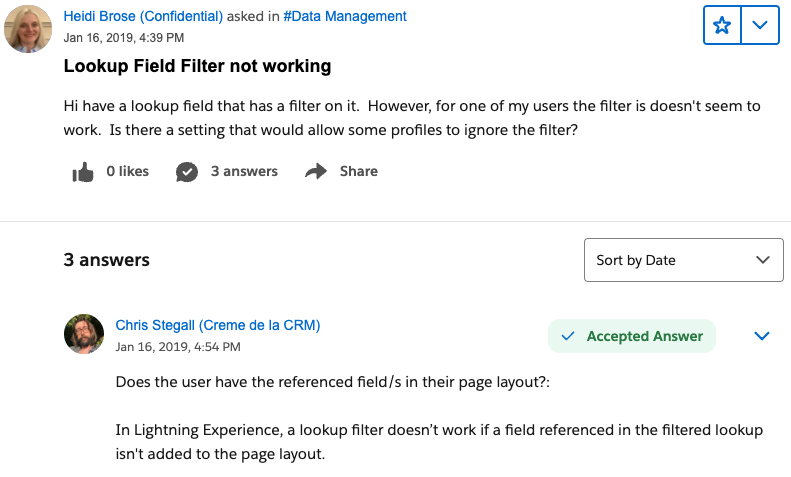
As my new favorite person Chris Stegall pointed out:
Your end user also needs at-least Read access to the field, too, although that’s self-evident imo!
Amusing that Salesforce’s help topic
- played up the obvious thing (“if you can’t see a field, you can’t see a field”) and
- downplayed the incredibly frustrating thing (“add the field to our deprecated UI or it won’t work in our current UI”).
Hat tip to hardworking Shelby Inloes for pointing this out!
* Yes, there are other ways in which Lightning Record Pages depend on Page Layouts. But the messed-up filtered-field situation is the one I feel annoyed about today.
Other Situations Where Lightning Record Pages Depend on Page Layouts:
| Item | Advice |
| “Record Detail” component | mostly use Dynamic Forms instead |
| “Related Lists”, “Related List – Single”, and “Related List – Quick Links” components | mostly use Dynamic Related Lists instead |
| “Highlights Panel” component | we’re stuck customizing it via the Compact Layout |
| Quick Actions | gotta add ’em to Page Layouts |
my coworker Josh Dehkordi points out that enabling Inline Editing, in both List Views and Reports, also depends on Page Layouts. tnx!
 Kudotek v2.0