Q: “How can I prevent the ‘Gemini’ palette from appearing every time I create a new Google Sheet?”
A: There’s no setting in Google Sheets to suppress it.
But the Tampermonkey browser extension, with a script, can do it:
1] install the Tampermonkey extension in your browser
2] click the Tampermonkey icon and select “Create a new script…”
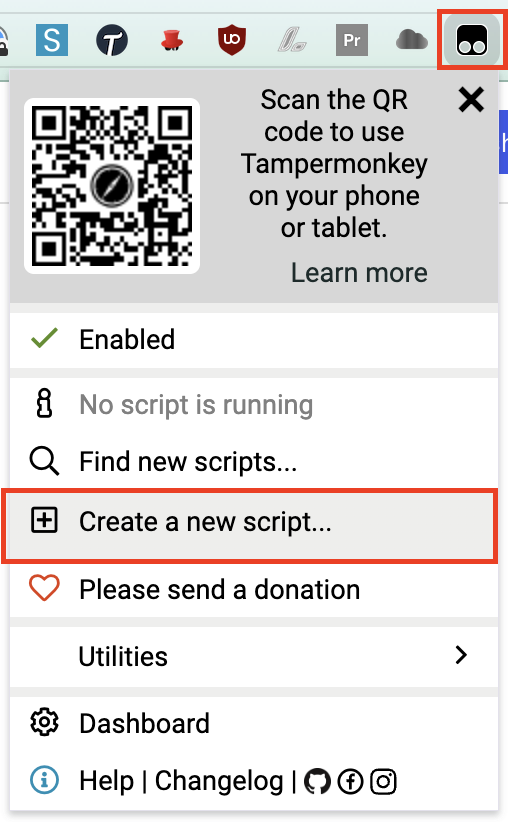
3] highlight the existing code in the <new userscript> window
4] replace the highlighted text by copying-and-pasting the code block below:
// ==UserScript==// @name Kill Google Sheets "Gemini" Sidebar// @namespace http://tampermonkey.net/// @version 2.0// @description Auto-dismisses the Gemini sidebar when it appears in Google Sheets// @match https://docs.google.com/spreadsheets/*// @grant none// @author Ezra Kenigsberg, kudotek.com// @copyright Copyright 2026 Ezra Kenigsberg// @license MIT; https://opensource.org/licenses/MIT// ==/UserScript==(function () { 'use strict'; const LOG_PREFIX = '[Kill Gemini Sidebar]'; function isVisible(el) { if (!el) return false; const style = window.getComputedStyle(el); return ( style.display !== 'none' && style.visibility !== 'hidden' && el.getClientRects().length > 0 ); }function findGeminiCloseButton() { // Never click Close controls inside dialogs such as Find and replace. const dialogSelector = [ 'dialog', '[role="dialog"]', '[role="alertdialog"]', '[aria-modal="true"]', '.modal-dialog' ].join(','); const selectors = [ 'button[aria-label="Close"]', '[role="button"][aria-label="Close"]', 'button[aria-label="Close Gemini"]', '[role="button"][aria-label="Close Gemini"]', 'button[aria-label="Close side panel"]', '[role="button"][aria-label="Close side panel"]', 'button[data-tooltip="Close"]', '[role="button"][data-tooltip="Close"]' ]; const candidates = document.querySelectorAll(selectors.join(',')); for (const button of candidates) { if (!isVisible(button) || button.closest(dialogSelector)) { continue; } // An explicit Gemini close label needs no ancestor search. if (button.getAttribute('aria-label') === 'Close Gemini') { return button; } let ancestor = button.parentElement; for ( let depth = 0; depth < 10 && ancestor; depth++, ancestor = ancestor.parentElement ) { // Don't use text from the whole page or a container // that also contains an unrelated dialog. if ( ancestor === document.body || ancestor === document.documentElement || ancestor.matches(dialogSelector) || ancestor.querySelector(dialogSelector) ) { break; } const text = ancestor.innerText || ''; if ( /\bGemini\b/i.test(text) || /\bAsk Gemini\b/i.test(text) || /\bBuild\b/i.test(text) ) { return button; } } } return null;} function dismissGeminiPane() { const closeButton = findGeminiCloseButton(); if (!closeButton) { return false; } console.log(LOG_PREFIX, 'Gemini sidebar found; closing it.'); closeButton.click(); return true; } /* * Gemini often appears a little after the spreadsheet itself loads. * MutationObserver catches DOM insertion, while the interval protects * against Google's SPA/rendering behavior where mutations aren't always * convenient to identify. */ let lastAttempt = 0; function maybeDismiss() { const now = Date.now(); // debounce the MutationObserver if (now - lastAttempt < 250) { return; } lastAttempt = now; dismissGeminiPane(); } const observer = new MutationObserver(maybeDismiss); function start() { observer.observe(document.documentElement, { childList: true, subtree: true }); // Immediate attempt dismissGeminiPane(); // And keep checking because Sheets is a SPA and Gemini can load late. setInterval(dismissGeminiPane, 1000); console.log(LOG_PREFIX, 'Active.'); } if (document.readyState === 'loading') { document.addEventListener('DOMContentLoaded', start, { once: true }); } else { start(); }})();
5] click “File | Save”
that’s it!
. . . this 2026-04-10 post was revised on 2026-09-23


if Google stops pushing Gemini in our faces and reverts to pushing Tables in our faces, Get Rid of “Tables” Palette When Creating a New Google Sheet
Pingback: Get Rid of Gemini’s Annoying Sidebar, v2 | Kudotek v2.0