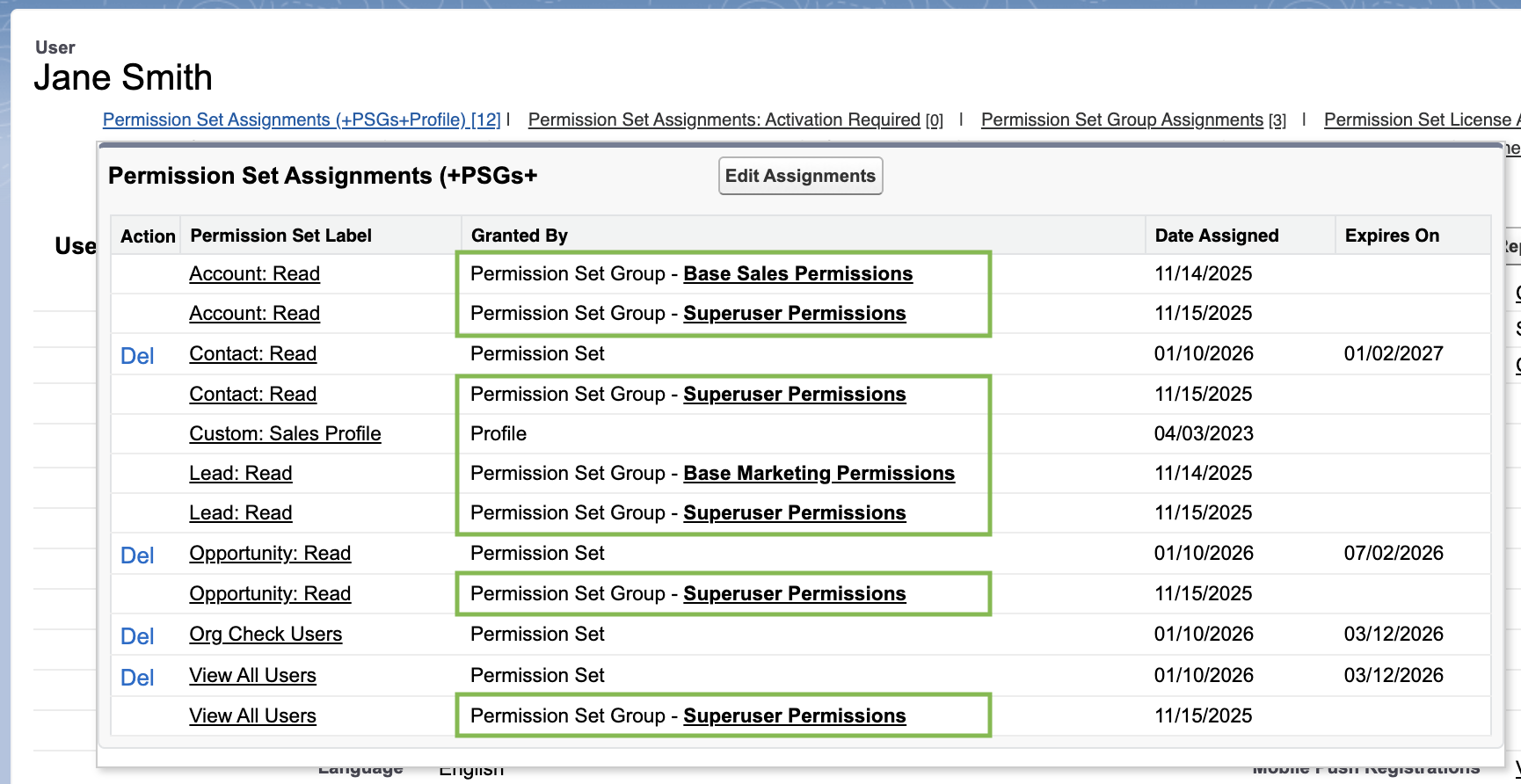
Note how Users can be granted the same Permission multiple times by different Permission Sets, Permission Set Groups, or Profiles. . . and I agree, the “Profile” lines are a little opaque!
As of November 15, 2025, here are the 398 System Permissions I found in API v62 (thank you Workbench!):
| Access Actionable Relationship Center for partner users | PermissionsFSCArcGraphCommunityUser |
| Access Activities | PermissionsActivitiesAccess |
| Access Contact Intelligence View in Partner Sites | PermissionsContactInspectorUser |
| Access Conversation Entries | PermissionsCanAccessCE |
| Access Custom Mobile Apps | PermissionsCustomMobileAppsAccess |
| Access Customer Asset Lifecycle Management APIs | PermissionsLifecycleManagementAPIUser |
| Access drag-and-drop content builder | PermissionsAccessContentBuilder |
| Access Experience Management | PermissionsAccessCMC |
| Access Lead Intelligence View in Partner Sites | PermissionsLeadInspectorUser |
| Access Libraries | PermissionsContentWorkspaces |
| Access Personalization Platform | PermissionsPersonalizationPlatform |
| Access Service Einstein | PermissionsAccessServiceEinstein |
| Access the Fulfillment Order routing APIs. | PermissionsUseRouting |
| Access to manage the template framework apps | PermissionsAppFrameworkManageApp |
| Access to view Data Assessment | PermissionsViewDataAssessment |
| Access to view templated apps and assets | PermissionsAppFrameworkViewApp |
| Access to View-Only Licensed Templates and Apps | PermissionsViewOnlyEmbeddedAppUser |
| Access Tracer for External Data Sources | PermissionsTraceXdsQueries |
| Access Virtual Desktop Infrastructure for Voice Calls through Citrix | PermissionsCitrixVDIPlatform |
| Account Switcher User | PermissionsAccountSwitcherUser |
| Activate Contracts | PermissionsActivateContract |
| Activate Orders | PermissionsActivateOrder |
| Add additional items to an order summary. | PermissionsUseAddOrderItemSummary |
| Add CRM Analytics Remote Connections | PermissionsAddAnalyticsRemoteConnections |
| Add order item summary level adjustments. | PermissionsUseAddAdjustment |
| Add People to Direct Messages | PermissionsAddDirectMessageMembers |
| Add Recipients to CRM Analytics Notifications | PermissionsAddWaveNotificationRecipients |
| Advanced Csv Data Import User Permission | PermissionsAdvancedCsvDataImportUser |
| Agent Initiated Outbound Messaging | PermissionsLMOutboundMessagingUserPerm |
| Agentforce Service Agent User | PermissionsAgentforceServiceAgentUser |
| Allow access to creating and editing reports in Data Cloud Reporting | PermissionsCdcReportingCreateReports |
| Allow Access to Customized Actions | PermissionsUseWebLink |
| Allow access to managing folders in Data Cloud Reporting | PermissionsCdcReportingManageFolders |
| Allow access to viewing reports in Data Cloud Reporting | PermissionsCdcReportingViewReports |
| Allow blockchain data upload | PermissionsEnableIPFSUpload |
| Allow consumer key and secret rotation | PermissionsClientSecretRotation |
| Allow Inclusion of Code Snippets from UI | PermissionsChatterComposeUiCodesnippet |
| Allow Sale Payments | PermissionsCombAuthAndCapPayments |
| Allow sending of List Emails | PermissionsListEmailSend |
| Allow user to access privacy data | PermissionsPrivacyDataAccess |
| Allow user to modify Private Connections | PermissionsManageExternalConnections |
| Allow users to manage models in Einstein Studio | PermissionsManageCdpMlModels |
| Allow users to view MLModels and related Entities | PermissionsViewMLModels |
| Allow View Knowledge | PermissionsAllowViewKnowledge |
| Allows the Cloud Integration User to perform SalesforceIQ internal operations | PermissionsSalesforceIQInternal |
| Allows users to modify Named Credentials and External Credentials | PermissionsManageNamedCredentials |
| Apex REST Services | PermissionsApexRestServices |
| API Enabled | PermissionsApiEnabled |
| Api Only User | PermissionsApiUserOnly |
| Approval Admin | PermissionsApprovalAdmin |
| Approval Designer | PermissionsApprovalDesigner |
| Assign Permission Sets | PermissionsAssignPermissionSets |
| Assign Topics | PermissionsAssignTopics |
| Attribution Model User | PermissionsAttributionModelUser |
| Author Apex | PermissionsAuthorApex |
| Authorize Payments | PermissionsAuthorizePayments |
| Basic Csv Data Import User Permission | PermissionsSimpleCsvDataImportUser |
| Bulk API Hard Delete | PermissionsBulkApiHardDelete |
| Campaign Influence | PermissionsCampaignInfluence2 |
| Can Approve Feed Post and Comment | PermissionsCanApproveFeedPost |
| Cancel order item summaries. | PermissionsUseOrderItemSummaryCancel |
| Capture and Reverse Payments | PermissionsCaptureAndReversePayments |
| Change Dashboard Colors | PermissionsChangeDashboardColors |
| Chatter Internal User | PermissionsChatterInternalUser |
| Close Conversation Threads | PermissionsCloseConversations |
| Configure Custom Recommendations | PermissionsConfigCustomRecs |
| Configure Dataspace Scope | PermissionsConfigureDataspaceScope |
| Configure Messaging | PermissionsConfigureLiveMessage |
| Connect Org to Customer 360 Data Manager | PermissionsManageHubConnections |
| Connect Org to Data Cloud | PermissionsManageC360AConnections |
| Connect Organization to Environment Hub | PermissionsConnectOrgToEnvironmentHub |
| Contact Center Admin | PermissionsIsContactCenterAdmin |
| Contact Center Agent | PermissionsIsContactCenterAgent |
| Contact Center Supervisor | PermissionsIsContactCenterSupervisor |
| Control Call Recording | PermissionsCanToggleCallRecordings |
| Convert Leads | PermissionsConvertLeads |
| Create AI Insight Objects | PermissionsAICreateInsightObjects |
| Create and Customize Dashboards | PermissionsCreateCustomizeDashboards |
| Create and Customize List Views | PermissionsCreateCustomizeFilters |
| Create and Customize Reports | PermissionsCreateCustomizeReports |
| Create and Edit CRM Analytics Dashboards | PermissionsInsightsAppDashboardEditor |
| Create and Own New Chatter Groups | PermissionsChatterOwnGroups |
| Create and Set Up Experiences | PermissionsManageNetworks |
| Create and Update Second-Generation Packages | PermissionsPackaging2 |
| Create AppExchange Packages | PermissionsCreateMultiforce |
| Create B2B Marketing Analytics Apps | PermissionsB2BMarketingAnalyticsUser |
| Create CMS Workspaces and Channels | PermissionsManageCMS |
| Create Content Deliveries | PermissionsDistributeFromPersWksp |
| Create credit memos. | PermissionsUseCreateCreditMemo |
| Create CRM Analytics Apps | PermissionsInsightsCreateApplication |
| Create Dashboard Folders | PermissionsCreateDashboardFolders |
| Create Folders for Lightning Email Templates | PermissionsCreateLtngTempFolder |
| Create Libraries | PermissionsCreateWorkspaces |
| Create order summaries by using APIs. | PermissionsUseCreateOrderSummary |
| Create Public Links | PermissionsChatterFileLink |
| Create Report Folders | PermissionsCreateReportFolders |
| Create Topics | PermissionsCreateTopics |
| Create, edit, and delete External Client Apps | PermissionsExternalClientAppDeveloper |
| Custom Applications for Field Service Mobile | PermissionsCustomAppsOnFSMobile |
| Customize Application | PermissionsCustomizeApplication |
| Data Cloud FlexCards for Financial Services Cloud | PermissionsPersonalizedFinanceUserAccess |
| Delete Activated Contracts | PermissionsDeleteActivatedContract |
| Delete Credit Memo and Invoice | PermissionsDeleteCrMemoAndInvoice |
| Delete Second-Generation Packages | PermissionsPackaging2Delete |
| Delete Topics | PermissionsDeleteTopics |
| Design and Deliver In-App Guidance | PermissionsCanEditPrompts |
| Digital Lending Admin User | PermissionsDigitalLendingAdminUser |
| Digital Lending Edit Read Only Party Related Records | PermissionsDigitalLendingEditReadOnly |
| Digital Lending User | PermissionsDigitalLendingUser |
| Digital Lending Workbench | PermissionsDigitalLendingWorkbench |
| Dispute Management User | PermissionsAccessToDisputeManagement |
| Download AppExchange Packages | PermissionsInstallMultiforce |
| Download CRM Analytics Data | PermissionsWaveTabularDownload |
| Download Package Version Zip Files | PermissionsDownloadPackageVersionZips |
| Drag-and-Drop Dashboard Builder | PermissionsCanUseNewDashboardBuilder |
| Edit Activated Orders | PermissionsEditActivatedOrders |
| Edit Case Comments | PermissionsEditCaseComments |
| Edit CRM Analytics Dataflows | PermissionsInsightsAppEltEditor |
| Edit Dataset Recipes | PermissionsCanEditDataPrepRecipe |
| Edit HTML Templates | PermissionsEditHtmlTemplates |
| Edit My Dashboards | PermissionsEditMyDashboards |
| Edit My Own Posts | PermissionsChatterEditOwnPost |
| Edit My Reports | PermissionsEditMyReports |
| Edit Opportunity Product Sales Price | PermissionsEditOppLineItemUnitPrice |
| Edit Posts on Records I Own | PermissionsChatterEditOwnRecordPost |
| Edit Read Only Fields | PermissionsEditReadonlyFields |
| Edit Repricing Information | PermissionsEditRepricing |
| Edit Topics | PermissionsEditTopics |
| Einstein Search | PermissionsUseMySearch |
| Email Administration | PermissionsEmailAdministration |
| Email-Based Identity Verification Option | PermissionsAllowEmailIC |
| Enable blockchain transaction polling API | PermissionsEnableBCTransactionPolling |
| Enable RecordVisibility API | PermissionsRecordVisibilityAPI |
| Enable Salesforce CMS Integration | PermissionsHeadlessCMSAccess |
| Enable System Mode Flow Activation | PermissionsActivateSystemModeFlows |
| Enable WDC | PermissionsWorkDotComUserPerm |
| Enable WDC Calibration | PermissionsWorkCalibrationUser |
| Enables the Appointment Booking feature | PermissionsAppointmentBookingUserAccess |
| End Messaging Session | PermissionsLMEndMessagingSessionUserPerm |
| Engagement Config User | PermissionsEngagementConfigUser |
| Enhanced Chat Agent | PermissionsEmbeddedMessagingAgent |
| Execute blind returns. | PermissionsUseOrderItemSummaryReturn |
| Execute ensure funds. | PermissionsUseEnsureFunds |
| Exempt from Transaction Security | PermissionsTransactionSecurityExempt |
| Export Reports | PermissionsExportReport |
| Facility Manager | PermissionsSchedulingFacilityManager |
| Files Connect Cloud | PermissionsContentHubUser |
| Freeze Users | PermissionsFreezeUsers |
| Give Recognition Badges in Experience Builder Sites | PermissionsGiveRecognitionBadge |
| Grant users permission to SfDrive | PermissionsAccessSfDrive |
| Headless Publish Nudges User | PermissionsHeadlessPublishNudges |
| Hide Option to Switch to Salesforce Classic | PermissionsPreventClassicExperience |
| Hide the Seen By List | PermissionsHideReadByList |
| Import Custom Objects | PermissionsImportCustomObjects |
| Import Leads | PermissionsImportLeads |
| Import Personal Contacts | PermissionsImportPersonal |
| Import Solutions | PermissionsSolutionImport |
| Initiate Messaging Sessions | PermissionsCanInitiateMessagingSessions |
| Insert System Field Values for Chatter Feeds | PermissionsCanInsertFeedSystemFields |
| Instant Actionable Results | PermissionsUseAssistantDialog |
| Invite Customers To Chatter | PermissionsChatterInviteExternalUsers |
| Knowledge One | PermissionsAllowUniversalSearch |
| Let a user be included in appointments in Salesforce Scheduler. | PermissionsLightningSchedulerUserAccess |
| Let greeters access the Lobby Management tab. | PermissionsLobbyManagementUserAccess |
| Lightning Console User | PermissionsLightningConsoleAllowedForUser |
| Lightning Experience User | PermissionsLightningExperienceUser |
| Lightning Login User | PermissionsAllowLightningLogin |
| Make Payments | PermissionsMakePayments |
| Manage Access Policies | PermissionsManageAccessPolicies |
| Manage Agentforce Service Agents | PermissionsManageAgentforceServiceAgent |
| Manage All Private Reports and Dashboards | PermissionsManagePvtRptsAndDashbds |
| Manage Articles | PermissionsEditKnowledge |
| Manage Auth. Providers | PermissionsManageAuthProviders |
| Manage Billing | PermissionsEditBillingInfo |
| Manage Bots | PermissionsBotManageBots |
| Manage Bots Training Data | PermissionsBotManageBotsTrainingData |
| Manage Business Hours Holidays | PermissionsManageBusinessHourHolidays |
| Manage Call Centers | PermissionsManageCallCenters |
| Manage Cases | PermissionsManageCases |
| Manage Categories | PermissionsManageCategories |
| Manage Certificates | PermissionsManageCertificates |
| Manage Chatter Messages and Direct Messages | PermissionsManageChatterMessages |
| Manage Connected Apps | PermissionsManageRemoteAccess |
| Manage Content Permissions | PermissionsManageContentPermissions |
| Manage Content Properties | PermissionsManageContentProperties |
| Manage Content Taxonomy | PermissionsManageContentTaxonomy |
| Manage CRM Analytics | PermissionsInsightsAppAdmin |
| Manage CRM Analytics Custom Maps | PermissionsCanManageMaps |
| Manage CRM Analytics Private Assets | PermissionsWaveManagePrivateAssetsUser |
| Manage CRM Analytics Subscriptions | PermissionsManageSubscriptions |
| Manage CRM Analytics Templated Apps | PermissionsManageTemplatedApp |
| Manage Custom Domains | PermissionsManageCustomDomains |
| Manage Custom Permissions | PermissionsManageCustomPermissions |
| Manage Custom Report Types | PermissionsManageCustomReportTypes |
| Manage Dashboards in Public Folders | PermissionsManageDashbdsInPubFolders |
| Manage Data Categories | PermissionsManageDataCategories |
| Manage Data Integrations | PermissionsManageDataIntegrations |
| Manage Data Mask Policies | PermissionsManageDataMaskPolicies |
| Manage Dataspace Scope | PermissionsManageDataspaceScope |
| Manage Dynamic Dashboards | PermissionsManageDynamicDashboards |
| Manage Email Client Configurations | PermissionsManageEmailClientConfig |
| Manage Email Templates | PermissionsEmailTemplateManagement |
| Manage Encryption Keys | PermissionsManageEncryptionKeys |
| Manage Entitlements | PermissionsManageEntitlements |
| Manage Experiences | PermissionsGovernNetworks |
| Manage Flow | PermissionsManageInteraction |
| Manage Health Check | PermissionsManageHealthCheck |
| Manage Integration Connections | PermissionsManageIntegrationConnections |
| Manage Internal Users | PermissionsManageInternalUsers |
| Manage IP Addresses | PermissionsManageIpAddresses |
| Manage Knowledge Article Import/Export | PermissionsManageKnowledgeImportExport |
| Manage Leads | PermissionsManageLeads |
| Manage Learning | PermissionsLearningManager |
| Manage Learning Reporting | PermissionsManageLearningReporting |
| Manage Letterheads | PermissionsEditBrandTemplates |
| Manage Lightning Sync | PermissionsManageExchangeConfig |
| Manage Login Access Policies | PermissionsManageLoginAccessPolicies |
| Manage Macros Users Can’t Undo | PermissionsSubmitMacrosAllowed |
| Manage MFA in API | PermissionsManageTwoFactor |
| Manage MFA in User Interface | PermissionsDelegatedTwoFactor |
| Manage Mobile Configurations | PermissionsManageMobile |
| Manage Next Best Action Recommendations | PermissionsManagePropositions |
| Manage Next Best Action Strategies | PermissionsManageRecommendationStrategies |
| Manage Orchestration Runs | PermissionsManageOrchestrationRuns |
| Manage Orchestration Runs and Work Items | PermissionsManageOrchInstsAndWorkItems |
| Manage Password Policies | PermissionsManagePasswordPolicies |
| Manage Policies’ Files And Attachments | PermissionsManageFilesAndAttachments |
| Manage Profiles and Permission Sets | PermissionsManageProfilesPermissionsets |
| Manage Promoted Search Terms | PermissionsManageSearchPromotionRules |
| Manage Public Classic Email Templates | PermissionsEditPublicTemplates |
| Manage Public Documents | PermissionsEditPublicDocuments |
| Manage Public Lightning Email Templates | PermissionsCreateLtngTempInPub |
| Manage Public List Views | PermissionsEditPublicFilters |
| Manage Published Solutions | PermissionsManageSolutions |
| Manage record types and layouts for Files | PermissionsManageContentTypes |
| Manage Release Updates | PermissionsManageReleaseUpdates |
| Manage Reporting Snapshots | PermissionsManageAnalyticSnapshots |
| Manage Reports in Public Folders | PermissionsManageReportsInPubFolders |
| Manage Roles | PermissionsManageRoles |
| Manage Salesforce CRM Content | PermissionsContentAdministrator |
| Manage Salesforce Knowledge | PermissionsManageKnowledge |
| Manage Security Center | PermissionsManageSecurityCommandCenter |
| Manage Session Permission Set Activations | PermissionsManageSessionPermissionSets |
| Manage Sharing | PermissionsManageSharing |
| Manage Stores | PermissionsManageStores |
| Manage Surveys | PermissionsManageSurveys |
| Manage Synonyms | PermissionsManageSynonyms |
| Manage Unlisted Groups | PermissionsManageUnlistedGroups |
| Manage Users | PermissionsManageUsers |
| Manufacturing Cloud Service Part Return Management User | PermissionsUseServicePartReturn |
| Mass Edits from Lists | PermissionsMassInlineEdit |
| Merge Topics | PermissionsMergeTopics |
| Message on Mobile | PermissionsMobileMessagingAgent |
| Messaging Agent | PermissionsLiveMessageAgent |
| Metadata studio User | PermissionsMetadataStudioUser |
| Migrate Enablement Content | PermissionsCMSECEAuthoringAccess |
| Moderate Chatter | PermissionsModerateChatter |
| Moderate Experience Cloud Site Users | PermissionsModerateNetworkUsers |
| Modify All Data | PermissionsModifyAllData |
| Modify All Policy Center Policies | PermissionsModifyAllPolicyCenterPolicies |
| Modify Data Classification | PermissionsModifyDataClassification |
| Modify Metadata Through Metadata API Functions | PermissionsModifyMetadata |
| Monitor Login History | PermissionsMonitorLoginHistory |
| Multi-Factor Authentication for API Logins | PermissionsTwoFactorApi |
| Multi-Factor Authentication for User Interface Logins | PermissionsForceTwoFactor |
| Natural Language Search | PermissionsUseQuerySuggestions |
| Omnichannel Inventory Basic | PermissionsOmnichannelInventoryBasic |
| Omnichannel Inventory Sync | PermissionsOmnichannelInventorySync |
| Password Never Expires | PermissionsPasswordNeverExpires |
| Payments Api User | PermissionsPaymentsAPIUser |
| Personalization Intelligence User | PermissionsPersonalizationIntelUser |
| Pin Posts in Feeds | PermissionsFeedPinning |
| Prism Playground User | PermissionsPrismPlaygroundUser |
| Provides access to Financial Services Email prompt templates | PermissionsAccessDisputePrompts |
| Public Complaint Management User | PermissionsAccessToComplaintMgmt |
| Query All Files | PermissionsQueryAllFiles |
| Query Non Vetoed Files | PermissionsQueryNonVetoedFiles |
| Queue Manager | PermissionsSchedulingLineAmbassador |
| Quip Metrics | PermissionsQuipMetricsAccess |
| Quip User Engagement Metrics | PermissionsQuipUserEngagementMetrics |
| Reassign Orchestration Work Items | PermissionsReassignOrchestrationWorkItems |
| Receive Certificate Expiration Notifications | PermissionsManageCertificatesExpiration |
| Recipes View Only | PermissionsCanViewDataPrepRecipe |
| Refund Payments | PermissionsRefundPayments |
| Remain in Salesforce Classic | PermissionsLtngPromoReserved01UserPerm |
| Remote Media for Virtual Desktop | PermissionsRemoteMediaVirtualDesktop |
| Remove People from Direct Messages | PermissionsRemoveDirectMessageMembers |
| Report Builder | PermissionsNewReportBuilder |
| Report Builder (Lightning Experience) | PermissionsCreateReportInLightning |
| Require Flow User Feature License | PermissionsFlowUFLRequired |
| Reset User Passwords and Unlock Users | PermissionsResetPasswords |
| Run Flows | PermissionsRunFlow |
| Run Macros on Multiple Records | PermissionsBulkMacrosAllowed |
| Run Reports | PermissionsRunReports |
| Sales Console | PermissionsSalesConsole |
| Sales Insights Admin | PermissionsSalesInsightsUser |
| Salesforce Anywhere in Lightning Experience | PermissionsIsotopeLEX |
| Salesforce Anywhere Integration Access | PermissionsIsotopeCToCUser |
| Salesforce Anywhere on Mobile | PermissionsIsotopeAccess |
| Salesforce Mobile App: Native scrolling on webviews | PermissionsNativeWebviewScrolling |
| Salesforce Mobile App: Native Seller Experience | PermissionsEnhancedSalesMobileExp |
| Schedule Reports | PermissionsScheduleReports |
| Segment Intelligence User | PermissionsSegmentIntelligenceUser |
| Select Files from Salesforce | PermissionsSelectFilesFromSalesforce |
| Send announcement emails | PermissionsSendAnnouncementEmails |
| Send Custom Notifications | PermissionsSendCustomNotifications |
| Send Initial SMS Message to Individual | PermissionsCanSendInitialSMSToIndividual |
| Send Non-Commercial Email | PermissionsTransactionalEmailSend |
| Send Outbound Messages | PermissionsEnableNotifications |
| Send Stay-in-Touch Requests | PermissionsSendSitRequests |
| Service Process User | PermissionsAccessToServiceProcess |
| Set Up Partner Connect for a Partner Org | PermissionsPrmExtIntPrtnrAdminUser |
| Share internal Knowledge articles externally | PermissionsShareInternalArticles |
| Show App Launcher in Experience Cloud Sites | PermissionsEnableCommunityAppLauncher |
| Show Company Name as Site Role | PermissionsShowCompanyNameAsUserBadge |
| Show Custom Sidebar On All Pages | PermissionsCustomSidebarOnAllPages |
| Skip Device Activation at Login | PermissionsSkipIdentityConfirmation |
| Stage Management Designer User | PermissionsStageManagementDesignUser |
| Subscribe to CRM Analytics Assets | PermissionsUseSubscriptionEmails |
| Subscribe to Dashboards | PermissionsSubscribeToLightningDashboards |
| Subscribe to Dashboards: Add Recipients | PermissionsSubscribeDashboardToOtherUsers |
| Subscribe to Dashboards: Send to Groups and Roles | PermissionsSubscribeDashboardRolesGrps |
| Subscribe to Reports | PermissionsSubscribeToLightningReports |
| Subscribe to Reports: Add Recipients | PermissionsSubscribeReportToOtherUsers |
| Subscribe to Reports: Send to Groups and Roles | PermissionsSubscribeReportRolesGrps |
| Subscribe to Reports: Set Running User | PermissionsSubscribeReportsRunAsUser |
| Test Sandboxes in Mobile Publisher for Experience Cloud | PermissionsSandboxTestingInCommunityApp |
| Transfer Cases | PermissionsTransferAnyCase |
| Transfer Leads | PermissionsTransferAnyLead |
| Transfer Record | PermissionsTransferAnyEntity |
| Update Consent Preferences Using REST API | PermissionsConsentApiUpdate |
| Update Email Messages | PermissionsCanUpdateEmailMessage |
| Upload AppExchange Packages | PermissionsPublishMultiforce |
| Upload External Data to CRM Analytics | PermissionsInsightsAppUploadUser |
| Use Advanced Delivery Estimation Service APIs | PermissionsUseAdvancedDeliveryEstimationAPI |
| Use CRM Analytics | PermissionsInsightsAppUser |
| Use CRM Analytics Templated Apps | PermissionsUseTemplatedApp |
| Use Delivery Estimation Service | PermissionsUseDeliveryEstimation |
| Use Delivery Estimation Service APIs | PermissionsUseDeliveryEstimationAPIs |
| Use Einstein Activity Capture | PermissionsAutomaticActivityCapture |
| Use Einstein Activity Capture Standard | PermissionsStdAutomaticActivityCapture |
| Use Identity Connect | PermissionsIdentityConnect |
| Use Identity Features | PermissionsIdentityEnabled |
| Use Inbox | PermissionsSalesforceIQInbox |
| Use Omnichannel Inventory APIs | PermissionsUseOmnichannelInventoryAPIs |
| Use Order Entry | PermissionsUseOrderEntry |
| Use Order Management Add Order Item Summary APIs | PermissionsUseAddOrderItemSummaryAPIs |
| Use Order Management Analytics | PermissionsUseOMAnalytics |
| Use Order Management Exchange APIs | PermissionsUseExchangesAPIs |
| Use Order Management Fulfillment APIs | PermissionsUseFulfillmentAPIs |
| Use Order Management Return APIs | PermissionsUseReturnOrderAPIs |
| Use Order Management Return Order | PermissionsUseReturnOrder |
| Use Payments or Access Payments | PermissionsViewPayments |
| Use Register Guest Buyer API | PermissionsUseRegisterGuestBuyerAPI |
| Use Repricing Objects and APIs | PermissionsUseRepricing |
| Use Team Reassignment Wizards | PermissionsUseTeamReassignWizards |
| User Has Unlimited Next Best Action Strategy Executions | PermissionsHasUnlimitedNBAExecutions |
| User license to access Lightning components and features delivered in Financial Services Cloud. | PermissionsFSCComprehensiveUserAccess |
| Verify Answers to Chatter Questions | PermissionsCanVerifyComment |
| View Access Policies | PermissionsViewAccessPolicies |
| View AI Insight Objects | PermissionsAIViewInsightObjects |
| View All Activities | PermissionsViewAllActivities |
| View All Custom Settings | PermissionsViewAllCustomSettings |
| View All Data | PermissionsViewAllData |
| View all External Client Apps | PermissionsExternalClientAppViewer |
| View all External Client Apps, view their settings, and edit their policies | PermissionsExternalClientAppAdmin |
| View All Lookup Record Names | PermissionsViewAllForeignKeyNames |
| View All Policy Center Policies | PermissionsViewAllPolicyCenterPolicies |
| View All Profiles | PermissionsViewAllProfiles |
| View All Users | PermissionsViewAllUsers |
| View All Voice And Video Calls | PermissionsViewAllCalls |
| View and Edit Converted Leads | PermissionsAllowViewEditConvertedLeads |
| View Concealed Field Data | PermissionsViewUserPII |
| View Content in Portals | PermissionsViewContent |
| View Content Taxonomy | PermissionsViewContentTaxonomy |
| View CRM Analytics on Experience Cloud site pages. | PermissionsWaveCommunityUser |
| View Dashboards in Public Folders | PermissionsViewPublicDashboards |
| View Data Categories in Setup | PermissionsViewDataCategories |
| View Developer Name | PermissionsViewDeveloperName |
| View Encrypted Data | PermissionsViewEncryptedData |
| View Event Log Files | PermissionsViewEventLogFiles |
| View External Client App Consumer Secrets in Metadata | PermissionsViewClientSecret |
| View Health Check | PermissionsViewHealthCheck |
| View Help Link | PermissionsViewHelpLink |
| View Login Forensics Events | PermissionsViewPlatformEvents |
| View My Team’s Dashboards | PermissionsViewMyTeamsDashboards |
| View Orchestrations in Automation App | PermissionsViewOrchestrationsInAutomApp |
| View Private Static Resources | PermissionsViewPrivateStaticResources |
| View Real-Time Event Monitoring Data | PermissionsViewDataLeakageEvents |
| View Recommendations | PermissionsViewRecommendations |
| View Reports in Public Folders | PermissionsViewPublicReports |
| View Restriction and Scoping Rules | PermissionsViewRestrictionAndScopingRules |
| View Roles and Role Hierarchy | PermissionsViewRoles |
| View Security Center pages | PermissionsViewSecurityCommandCenter |
| View Setup and Configuration | PermissionsViewSetup |
| View Threat Detection Events | PermissionsViewAnomalyEvents |
| Waive Multi-Factor Authentication for Exempt Users | PermissionsBypassMFAForUiLogins |
| Weekly Data Export | PermissionsDataExport |






 Kudotek v2.0