Did the old DemandTools (v2.xx, the one with the ’90s Windows 3 UI) have these bugs?
1] if
I have a unique-indexed field and
I tell DT to copy a losing record’s unique ID onto a winning record,
it deletes the losing record. . . even if I told it not to delete losing records
2] the FieldCopyUnique command fails to migrate certain values from losing records to winning records
for me, it’s working with Text, but failing with URLs and Phone Numbers
UPDATE 2024-04-03: we think this problem was caused when by cloning one of DT’s pre-existing merge scenarios. If we build a scenario from scratch, FieldCopyUnique works properly.
Q: How do I find which fields in a Salesforce object are Compound fields?
A: Run this SOQL query:
SELECT Label, MasterLabel, Name FROM EntityParticle WHERE EntityDefinitionId = 'Opportunity' AND FieldDefinitionId IN (SELECT DurableId FROM FieldDefinition WHERE IsCompound = TRUE)
. . . change Opportunity to the API Name of the object you’re querying.
The query above is mighty useful when you’re querying the Bulk API.
Q: How do I make my Apple Watch send sound to my earphones by default instead of my iPhone?
A: Heck if I know.1 But I have got an okayish workaround:
create earphone-connecting shortcut(s) for your Apple Watch, and
add those shortcuts as complications to the watch face of your choice.
I have two pairs of Shokz earphones, so I created one shortcut for each.
(For grins, I also created a “Low Power” shortcut to turn off Cellular, WiFi, and Bluetooth all at once.)
Step-by-step, here’s what I did.
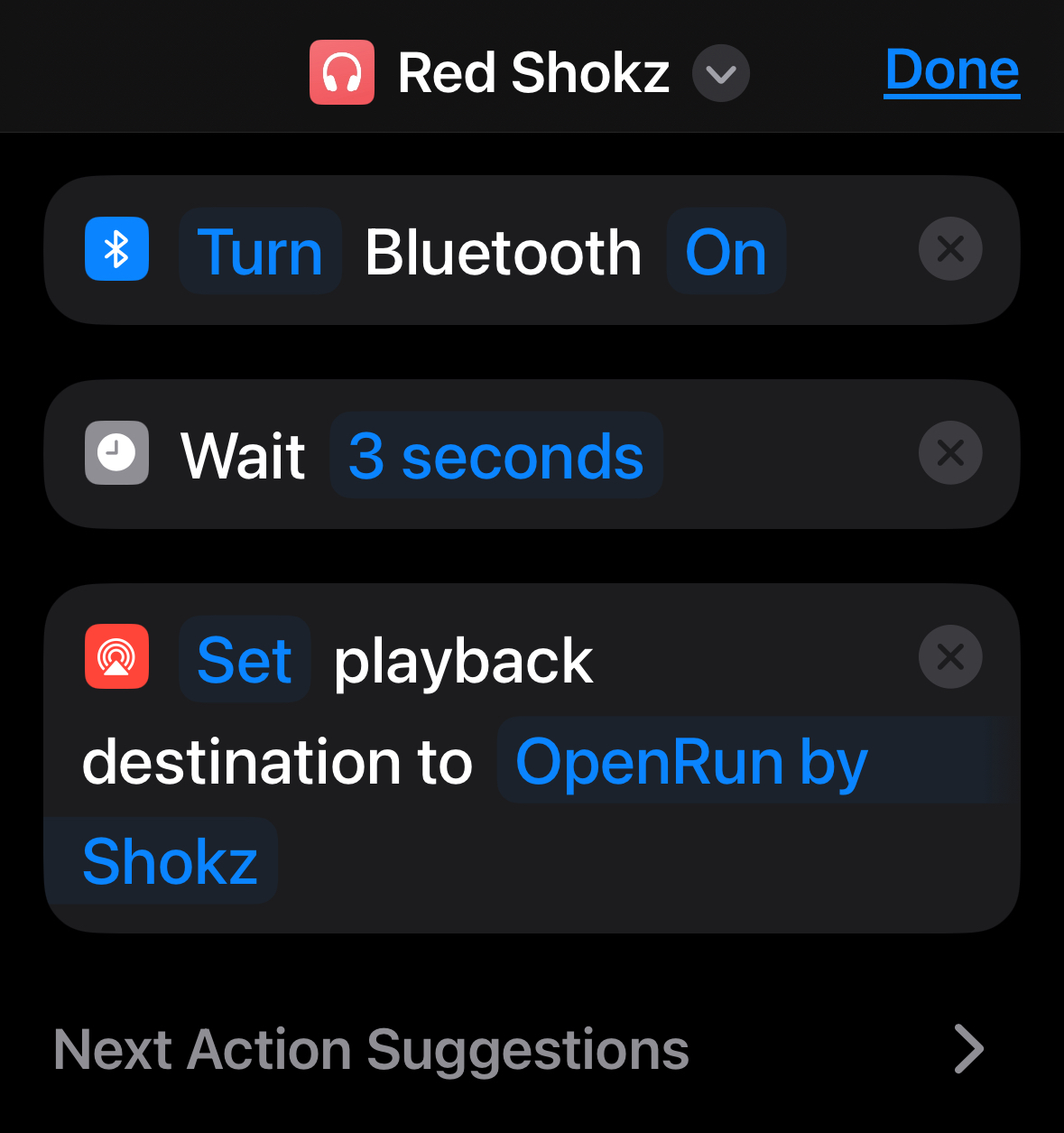
1] In Apple’s Shortcuts app on your iPhone or iPad, create a new Shortcut with three actions:
Quick notes:
for some reason, you gotta do this on an iOS device (eg, an iPhone or an iPad). Try to do it in MacOS (eg, on a MacBook) and the Shortcuts app won’t let you create the “Set playback destination” step ¯\_(ツ)_/¯
customize the third step’s device as needed
make sure to bring up the “Details” screen for the shortcut (by touching the ⓘ icon) and activate the “Show on Apple Watch” switch
2] Edit the desired watch face, choose a complication slot, choose the Shortcuts app, and finally select the specific shortcut(s) you created in step 1.
Helpfullest two notes here:
if you’ve got a favorite watch face, you can clone it and populate the clone with different complications, and
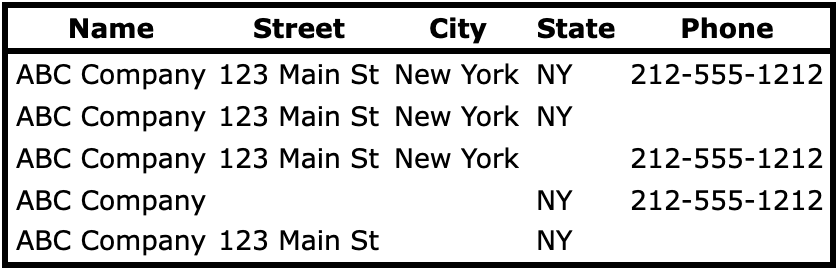
I thought DemandTools enabled merging records where you’re matching on fields like the following. No-brainer, right?
It doesn’t, unless you use a hide-your-eyes ugly workaround.
The details:
Look at how none of the dummy records above has the same blanks.
You’d think DemandTools’ “Blank Values” checkbox would handle those inconsistencies, yah? Wrong!
“Blank Values” enables this kind of match:
It does not enable this kind of match:
The fix for this is a goofy workaround which is marginally acceptable if you’re only matching on two fields, but gets exponentially worse with each additional matching field. Boo.
Q: How do I add curved text to a Canva Design? A: The simple way: 0] select the text box 1] click the “Effects” button in the toolbar at the top of the screen 2] select “Curve” from the left-hand “Effects” palette 3] customize how many degrees the text should cover using the “Curve” slider
The fancy way: install TypeCraft. It gives you more customizable control over text options, but strikes me as overkill 80% of the time.
which, if you want to send to someone, can be simplified to
https://www.canva.com/design/[11CharDesignID]
If you want to send a link to a particular page, right-click (or Control-click on a Mac) a page in the “Pages” tray at the bottom of the screen and choose “Copy link to this page”: