Q: How do I make my Apple Watch send sound to my earphones by default instead of my iPhone?
A: Heck if I know.1 But I have got an okayish workaround:
- create earphone-connecting shortcut(s) for your Apple Watch, and
- add those shortcuts as complications to the watch face of your choice.
I have two pairs of Shokz earphones, so I created one shortcut for each.
(For grins, I also created a “Low Power” shortcut to turn off Cellular, WiFi, and Bluetooth all at once.)

Step-by-step, here’s what I did.
1] In Apple’s Shortcuts app on your iPhone or iPad, create a new Shortcut with three actions:
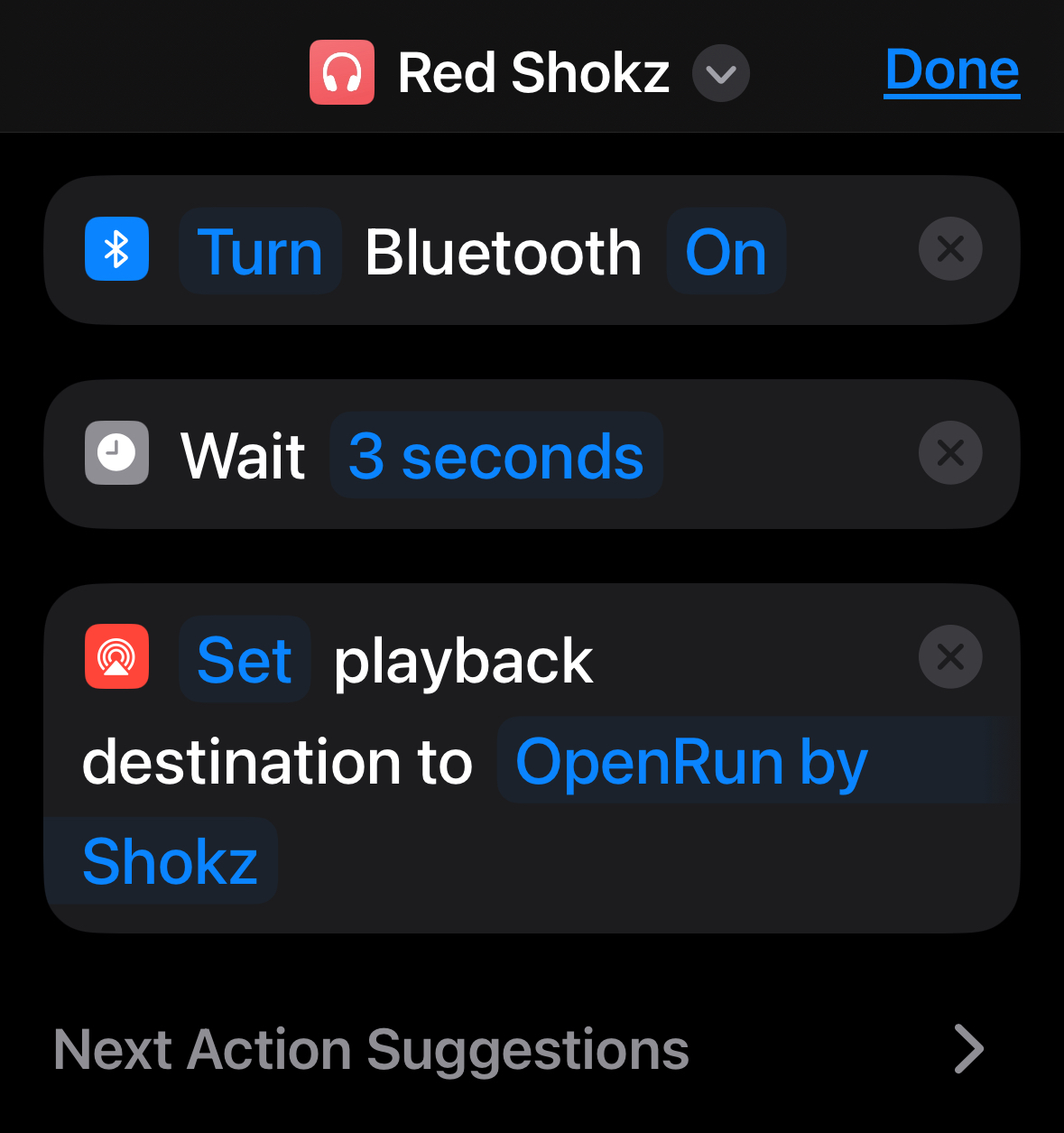
Quick notes:
- for some reason, you gotta do this on an iOS device (eg, an iPhone or an iPad). Try to do it in MacOS (eg, on a MacBook) and the Shortcuts app won’t let you create the “Set playback destination” step ¯\_(ツ)_/¯
- customize the third step’s device as needed
- make sure to bring up the “Details” screen for the shortcut (by touching the ⓘ icon) and activate the “Show on Apple Watch” switch
2] Edit the desired watch face, choose a complication slot, choose the Shortcuts app, and finally select the specific shortcut(s) you created in step 1.
Helpfullest two notes here:
- if you’ve got a favorite watch face, you can clone it and populate the clone with different complications, and
- you can configure your watch to swipe between watch faces.
That’s it! The earphone-handoff between iPhone and Watch still isn’t perfect, but it’s better.
Oh: and I installed additional actions for the Shortcuts app. I’m quite psyched to try out some of these 121 (!) new actions.
- 90% of the times I tell my Apple Watch to play music or a podcast to my earphones, the sound comes out of my iPhone’s speaker instead.
Which has me fascinated: which Apple designer decided we’d want to use the Watch to control the iPhone’s speaker?
I have never, ever wanted to control the iPhone’s speaker from my Watch, and I’m hardpressed to imagine anyone ever asked for that. ↩︎
 Kudotek v2.0
Here’s my previous post on making the Apple Watch do my bidding