Make Salesforce Usernames Always Match Email Addys

Q: “I have lots of Salesforce logins. How do I make my username always match my email address?”

A: If you use Gmail, learn the power of pluses and periods!

Gmail tolerates extra characters in the email address. Let’s take the arbitrary email address datanerd@gmail.com. Emailing any of the following addresses will reach that recipient:

In a nutshell:

  1. Gmail addresses tolerate a plus sign followed by any sequence of letters, numbers, periods, and underscores after your username and before the @ symbol.
  2. Gmail addresses tolerate periods anywhere before the @ symbol.

Armed with this knowledge, I make each of my usernames match its email address–way less mental strain that way!


Another awesome benefit of this feature is it enables easy searching of emails.

Let’s say I have an org called “NewKillerApp”. If I put +NewKillerApp in the username and email address I use for this org, searching on “+NewKillerApp” in my Gmail turns up all the emails specifically related to that org.

Here are the full details (. . . from a 2008 Google post)

Thanks to former coworker Luis Botero for reminding me of this cool feature!

Stop Watching Issues, Jira!

Q: How do I stop Jira automatically setting me as a watcher every time I create or contribute to an issue?

A: In any Jira screen,

1] click your Account menu in the upper right-hand corner and choose “Personal Settings“:

2] In Personal Settings, change “Watch your issues” to “Disabled” and click the “Save changes” button:

that’s it!


plucked from this Jira support page.

Can Integration Licenses See Standard Objects?

Q: Can Salesforce Integration Licenses access Standard Objects like Accounts and Opportunities?

A: Yes, but only with some configuration weirdness!

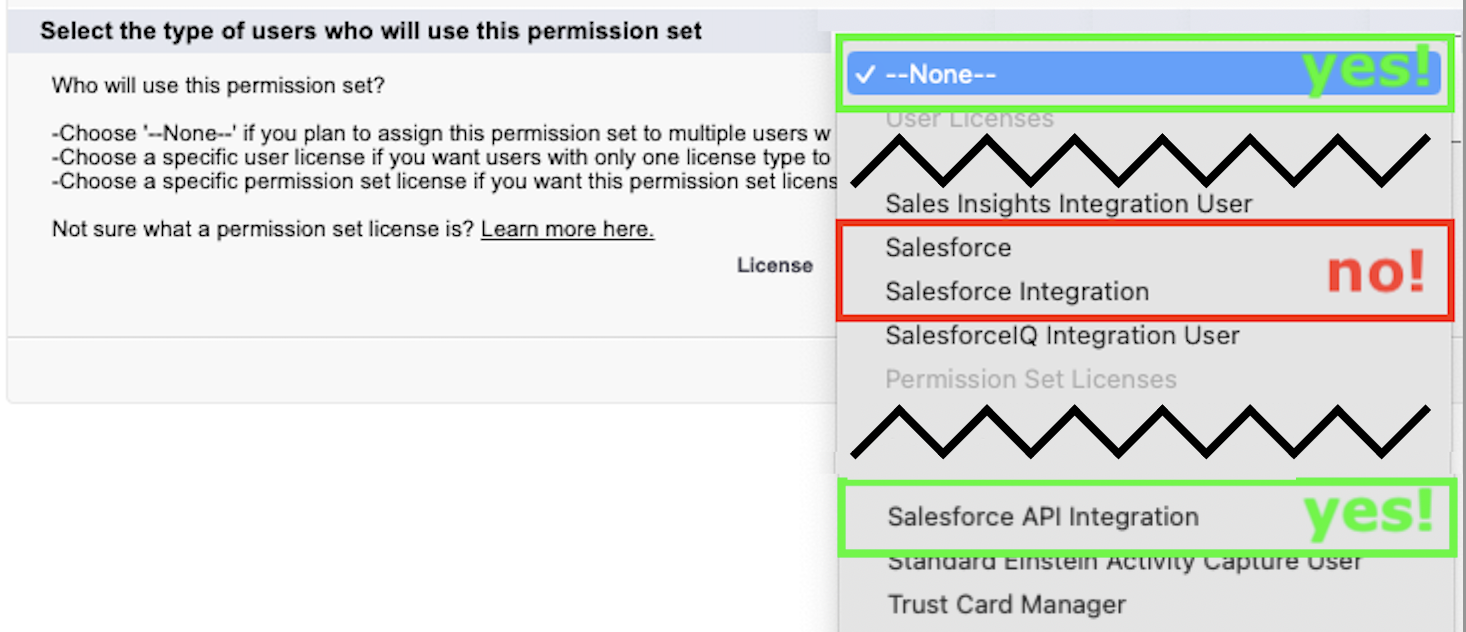
To access Standard Objects, a userid with a Salesforce Integration License must be assigned to the right kind of Permission Set: the Permission Set’s “License” field must be set to

  • no specific License, or
  • a “Salesforce API Integration” License:
  • a Permission Set whose “License” field is “Salesforce” can’t be assigned to a userid with a Salesforce Integration License, and
  • a Permission Set whose “License” field is “Salesforce Integration” can’t access Standard Objects.
  • And a Salesforce Integration License’s Profile can’t access Standard Objects, either.

go figure.

thanks to Josh Dehkordi and Surya Kamkipati for their help sorting this out!

Blocking Browser Ads, the DIY Way

Q: How do I block browser advertisements without purchasing an ad blocker?

A: Adding entries to your HOSTS file enables you to block advertisements by blocking ad-servers’ domains. To install:

1] download the “hosts.zip” file from this website.

2] install it as follows:

For Windows PC: instructions on that page help you install the HOSTS file on your computer.

For MacOS: I copied the contents of the text file in hosts.zip, and added it to my Mac’s HOSTS file by

  1. double-clicking my hard drive icon;
  2. pressing ⌘-Shift-Period in the Finder window to view all files;
  3. double-clicking the etc folder, then
  4. opening the HOSTS file in a text editor (I use Visual Studio Code), pasting in the clipboarded contents, and saving.

For Unix: heck if I know

Divorce Google! Part 2

Q: How do I view YouTube videos without participating in its toxic recommendation algorithm?

A: Three steps!

1] install Auto Incognito Mode in your browser

2] click the Auto Incognito Mode extension’s button (it looks like a hat and sunglasses) and select “Options” from the dropdown menu:

3] add the following two lines to the list of filters, then click the Save button:
*://*.youtube.com/*
*://youtube.com/*

that’s it!


ps while we’re at it. . .

  • I also strongly recommend switching from Chrome to Brave. It’s easy!
  • heck, add filter lines to run your Google searches anonymously:
    *://www.google.com/*
    *://google.com/*

All chapters of “Divorce Google”:

Reset Flow Limits with Pause Element

Has anyone tried this? Has it worked for you?

Yumi Ibrahimzade’s “Salesforce Time” blog floated a fascinating idea:

adding a zero-duration Pause Element to an Autolaunched Flow.

“By doing so,” Yumi writes, “this element will end the flow transaction, which will reset the flow limits.”

configuring that would look like this:

. . . I imagine this easily fixes a Flow that’s running into limit errors.

On the flip side, I could imagine this superficially fixing a Flow without addressing underlying problems.

I’d love to hear your experience! I hope to update this post after I get a chance to test.

Symmetry in Action

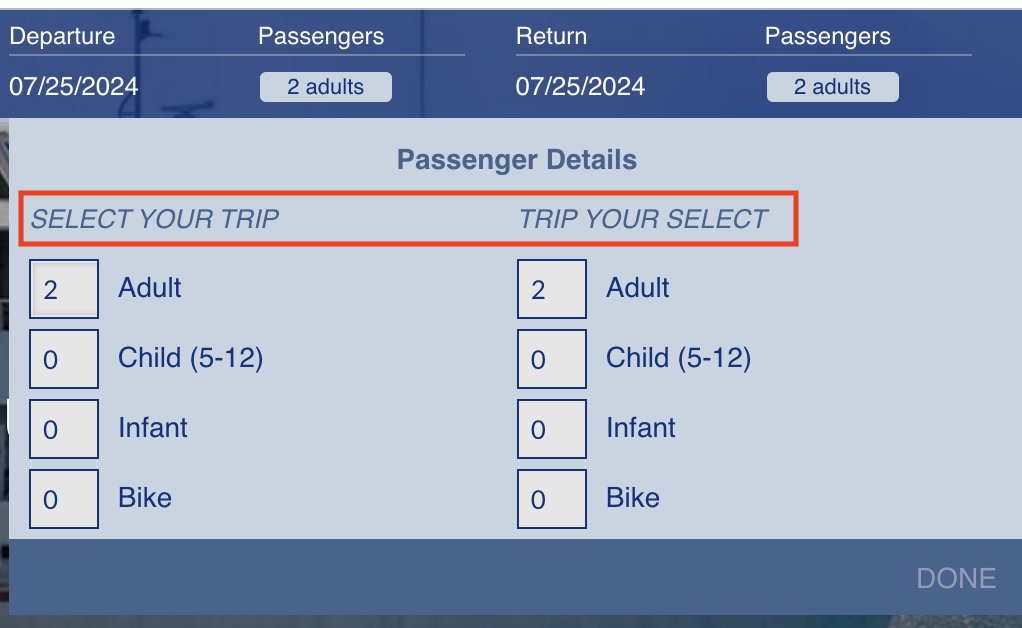
If the prompt for the outbound ticket is “Select Your Trip”, there’s a lovely symmetry in captioning the return trip “Trip Your Select”!

  • I free-associated to that Beastie Boys line “I’m losing my mind, this time / This time I’m losing my mind”
  • “Tceles Ruoy Pirt” also would’ve been great
  • Everybody could use more Blake

Report Summary Formulas Still Don’t Support Dates? wtf

Salesforce’s Reporting capability, always wonky, still doesn’t support dates in its Summary Formulas. Users need Custom Summary Formulas to return Dates.

It’s deeply frustrating that this ticket, which merged previous requests for Custom Summary Formulas to return Dates, was marked “Delivered” when the underlying need remains undelivered.

Vote for the ideas that capture this longtime, simple need: