Category Archives: Uncategorized

Migrating Process Builder to Flow: The Third Way

Q: How can I migrate Processes to Flows?

A: SalesforceBen documents two ways (1. Salesforce’s own Migrate to Flow capability, and 2. Unofficial SF’s ConvertToFlow).

But I see a weakness: if either fails to digest a Process, it poops out halfway through and leaves me nothing to build on.

A third way is called for! If Migrate to Flow and ConvertToFlow don’t work for ya, try a little URL hacking:

  1. Open Developer Console, flip to the Query Editor tab, and check the “Use Tooling API” checkbox
  2. run the following query:

SELECT Id, DeveloperName, MasterLabel, Description, LatestVersionId, ActiveVersionId
FROM FlowDefinition
ORDER BY DeveloperName

  1. replace the 301 ID in the URL below with any Flow Definition Version ID from step 2 above:

https://na1.salesforce.com/builder_platform_interaction/flowBuilder.app?flowId=301abcdefghijklAAA

or, if you’re working in a Sandbox:

https://cs1.salesforce.com/builder_platform_interaction/flowBuilder.app?flowId=301abcdefghijklAAA

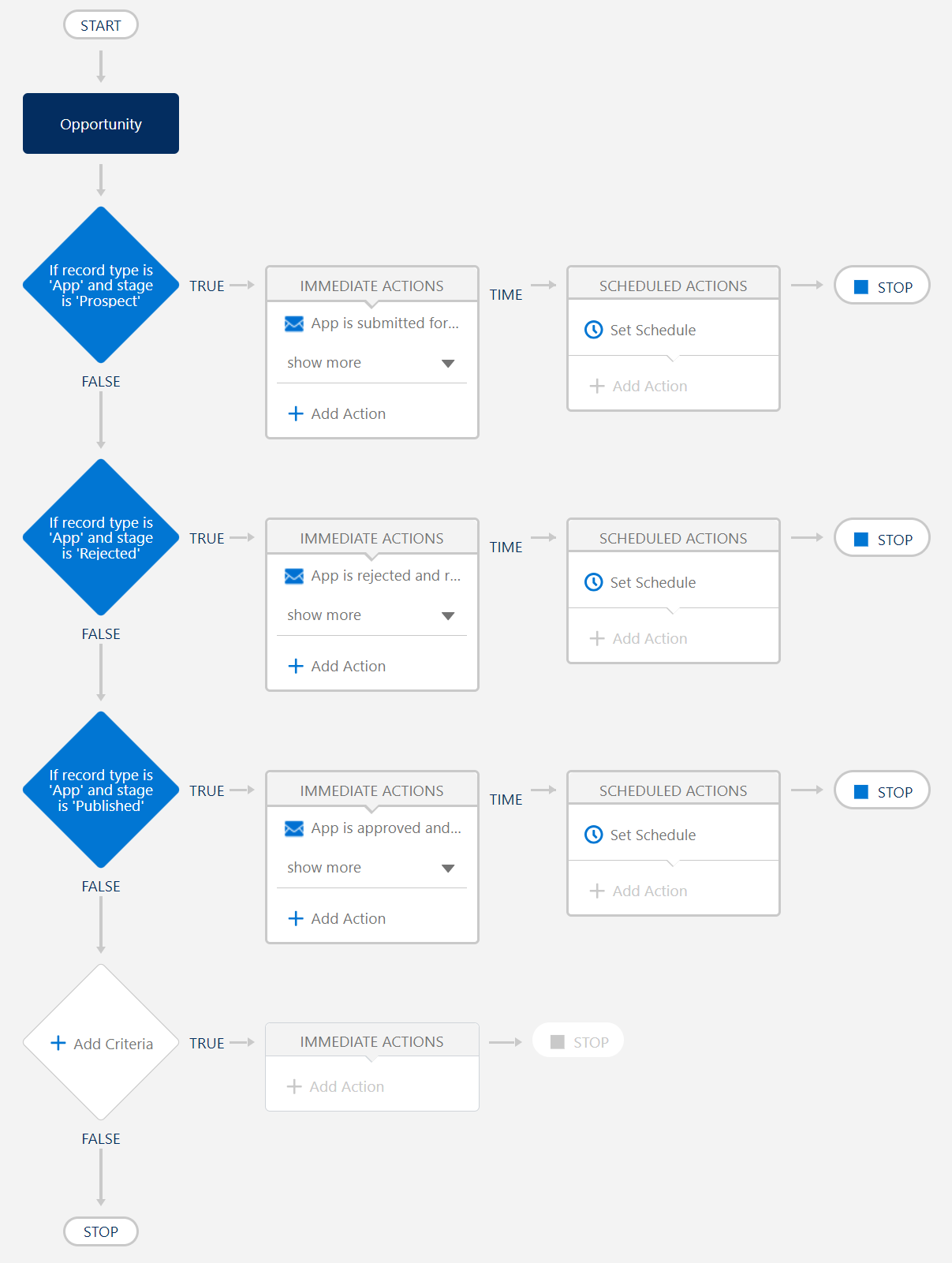
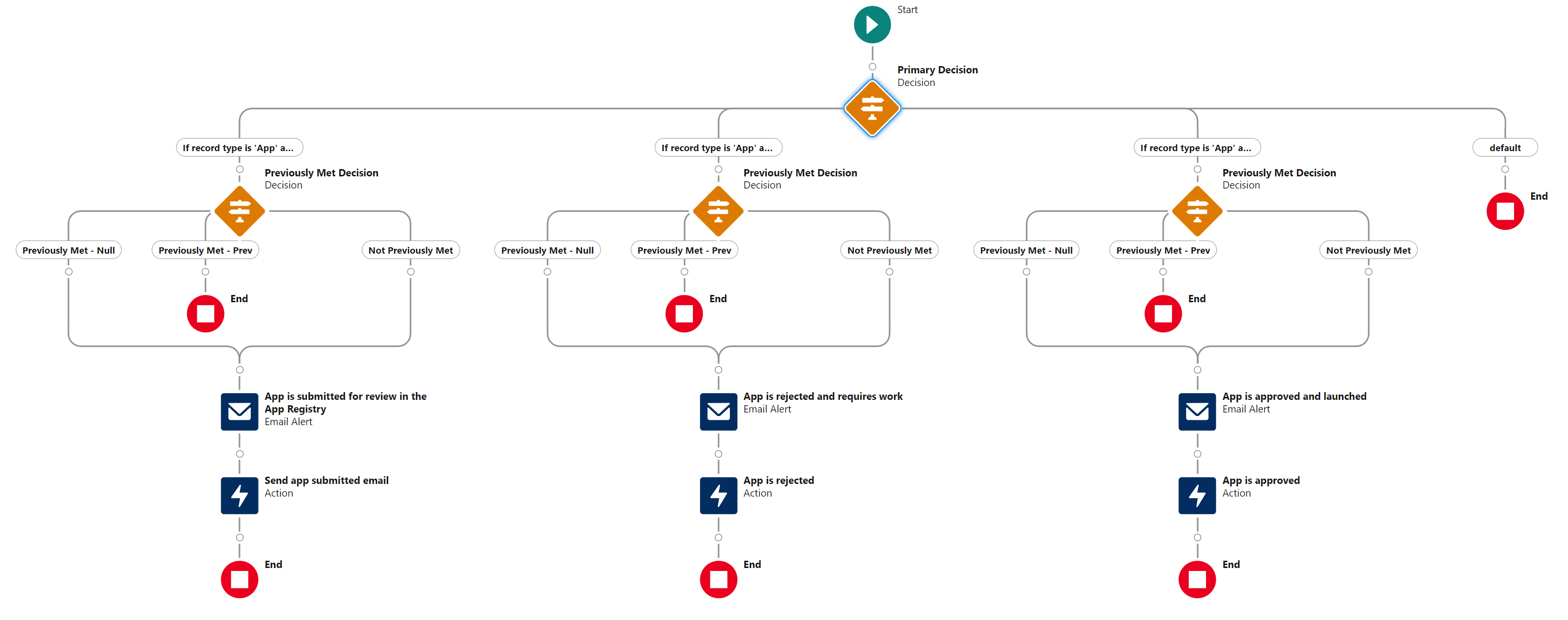
And pow, hey wow, whaddaya know, you’ve taken a Process like this

and converted it into a Flow like this (after you toggle from “Free-Form” to “Auto-Layout”):

. . . I still haven’t figured out how to save it as a BeforeSave. Because it came from a Process, it seems locked into being an AfterSave, ugh. Still working on that!

How Many Profiles Should I Have?

Q: With the advent (and ever-increasing features) of Permission Sets, how many Profiles should I assign my users to?

A: Louise Lockie’s terrific Dreamforce ’23 presentation, Architect a Permission-Set-Led Security Model (pp 29-34), advocates slimming down to three Profiles:

  • System Administrator (standard or custom)
  • API/Integration Profile (custom, using “Salesforce Integration” User License)
  • User Profile (custom, cloned from “Minimum Access – Salesforce” Profile)

The latter two Profiles should grant

  1. the barest-bones permissions and object/field access (when in doubt, leave it out!), with
  2. whatever Login/Session/Password settings adhere to your organization’s security policy.

Everything else can be granted by Permission Sets. Don’t forget to leverage features like

  • Permission Set Groups — to define a collection of Permission Sets that apply to a generalized Role like Sales Rep, Customer Support Rep, or Sales Manager. (Don’t forget the power of muting!)
  • User Access Policies — to assign Permission Sets and Permission Set Groups programmatically (eg, “if user has a ‘Sales Rep’ Role, assign them the ‘Sales Rep’ Permission Set Group”).
  • PermSet List Plus — to list all PermSets (whether assigned via PermSet OR PermSetGroup) in a single place

Three more random thoughts:

  1. User Access Policies is the feature I have really high hopes for. Programmatically assigning Permissions is huge. Sadly, at least as of this writing (2023-11-14), the feature still has some glaring omissions. In particular,
    • it doesn’t support OR boolean logic,
    • nor does it support specifying multiple values for fields like Department.
  2. I encourage you to name API/Integration Users with a consistent naming scheme that makes ’em easy to pick out. Personally, I set such users’
    • First Name to null, and
    • Last Name to “API User: [System]”, like “API User: NetSuite”.
  3. Supporting materials from Louise Leckie’s presentation can be found at bit.ly/PS-LL. So gratifying to see someone else is a Bitly fan!

How Much Am I Paying Salesforce to Hide Data from Me?

A lot. Beware “Archived Activities”: Salesforce’s quiet policy of hiding Task and Event records from end users after a year.*

Remember Salesforce storage is wildly expensive, hundreds or thousands of times more what it costs to store data in other clouds.

Archive-and-purge old Activities from Salesforce or pay the price!


* The specifics: any

  1. Event created more than 365 days ago,
  2. Closed-Task-with-a-due-date due more than 365 days ago, or
  3. Closed-Task-without-a-due-date created more than 365 days ago

disappears from Reports, Dashboards, and Related Lists. (You can see them by clicking “View All” buttons/links. In my experience, almost no one does that.)

I was also surprised to learn–just today!–that Salesforce enables customers to increase the 365-day threshold. The setting is called “Archive Days”, although beware performance degradation if you increase this too much.

Wordle Counter: “Which Word Should I Play Next?”

Long story short: make a copy of this spreadsheet to speed up your Wordle-solving!


The gory details: If you obsess over Wordle like I do, you’ve probably run into the conundrum of

  • having narrowed the answer to a smallish set of words, but
  • being unsure which word to play next.

My friend Dave and I are convinced: the best approach is to list all the candidate words, count the number of times each letter appears in all the candidates, and play the word whose letters appears in the most candidates.

Not difficult, but time-consuming! Save yourself time by entering the words in the Wordle Counter, and letting it do the counting for you.

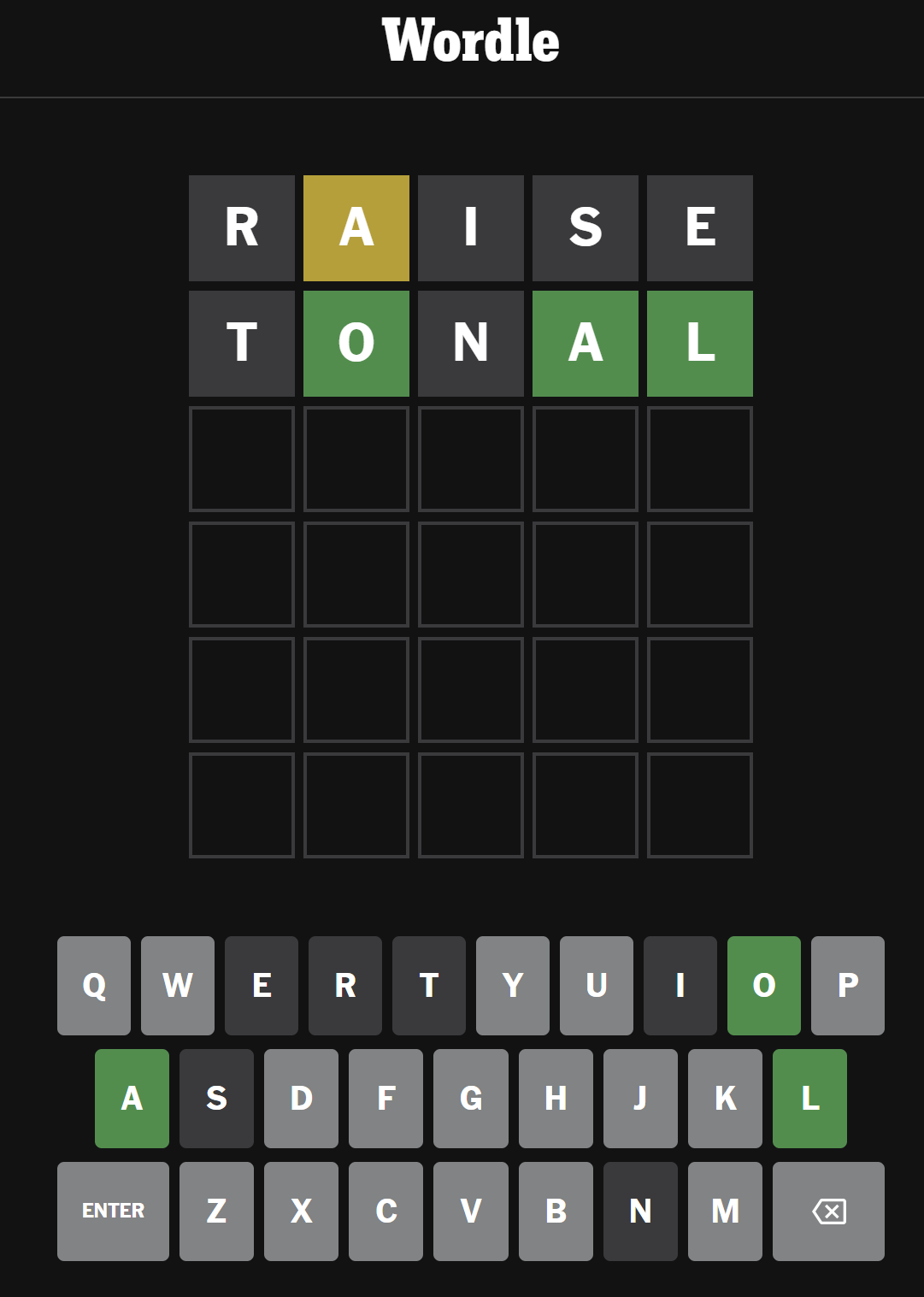
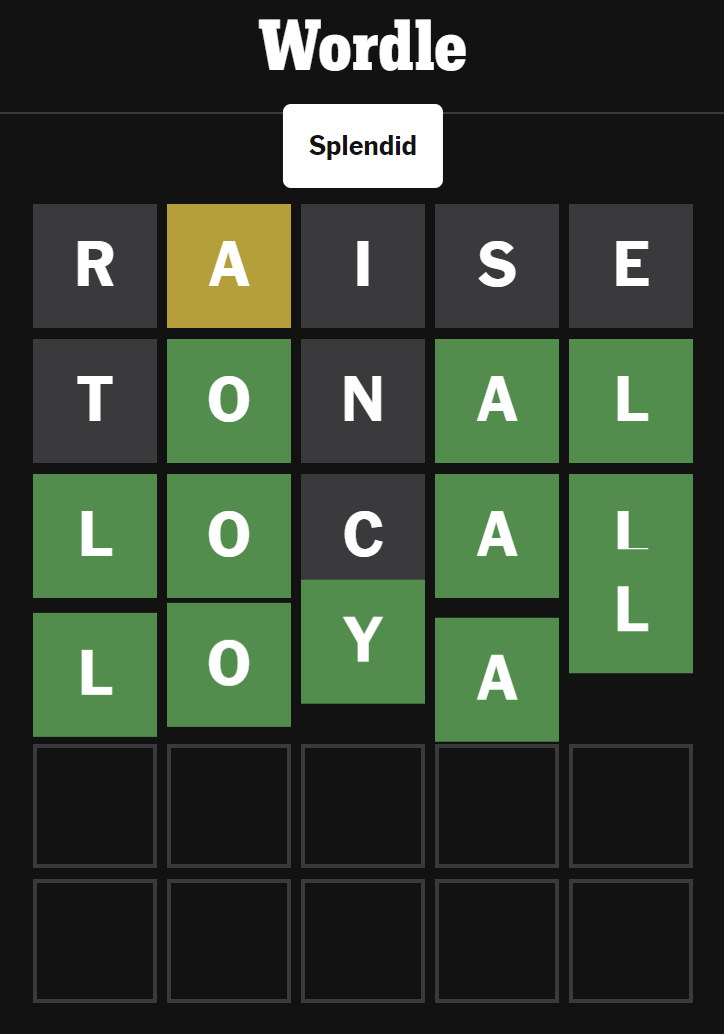
Example: today (September 26th, 2023), I was staring at this after two turns:1

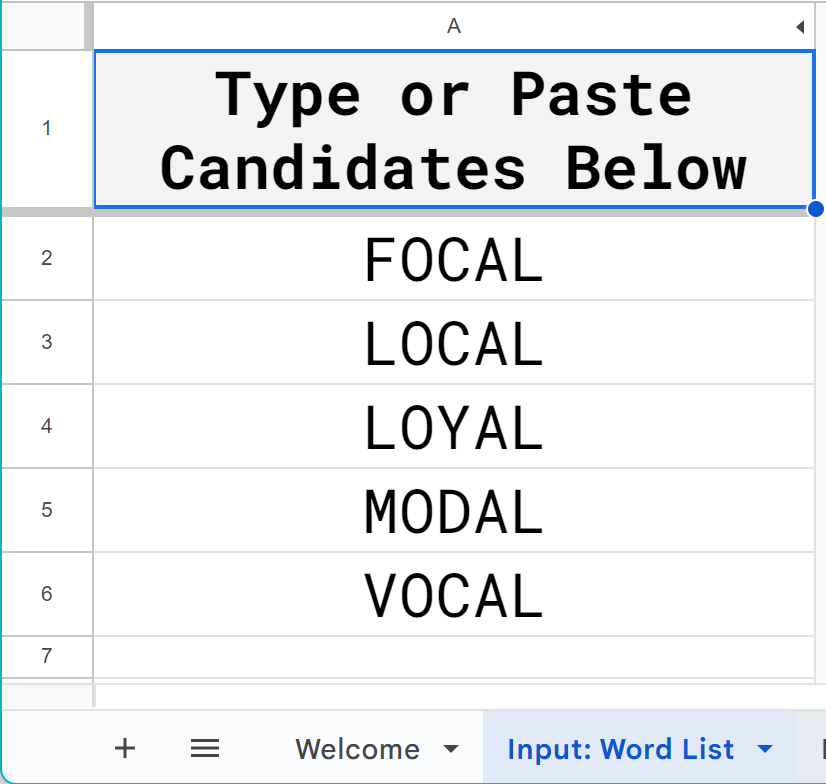
I came up with five possible words:
FOCAL
LOCAL
LOYAL
MODAL
VOCAL

. . . but which one’s the best to play next?

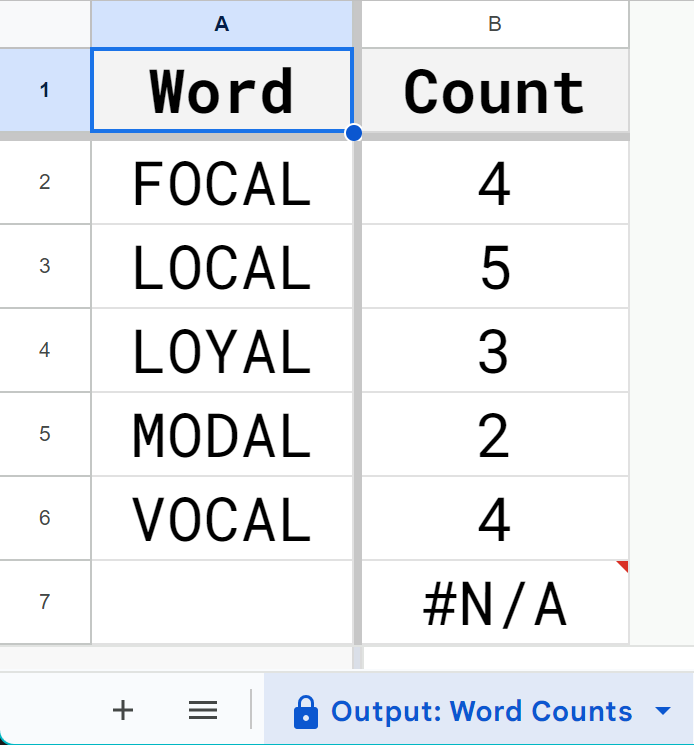
1] I pasted those five words into Wordle Counter’s “Input: Word List” tab:

2] then on the “Input: Parameters” tab I told Wordle Counter which letters I wanted to count (and activating the “Count by WORD?” setting prevents a duplicate letter from being double-counted within a single word):

And voila, Wordle Counter tells me how many times letters appear in those spots:

. . . and how many times each of those letters appears in my candidate words:

Armed with that information, I played the highest-freq word LOCAL and guaranteed getting the answer in two or fewer guesses:

try it out!2

  1. RAISE as my first play? Yup, I’m convinced, after looking at Wikipedia’s entry on letter frequencies (and sorting the table by descending order of letters in dictionary words), that RAISE is your best play. Come at me, bro. ↩︎
  2. I’m still tweaking it. I’m not sure it’s working right in every situation, but I’m really proud of some of the ARRAYFORMULA() logic. ↩︎

“How Worried Should I Be About My Salesforce Community’s Security?”

Q: “How worried should I be about my Salesforce Community’s security?”

A: Let’s say “more vigilant than you are right now”, ie, pretty worried.

  • This article gets at the problem: Salesforce makes it easy to accidentaly set up a Community that overshares data.

Salesforce, in weaselly corporate fashion, doesn’t shout this problem from the rooftops, but instead quietly pushes out Release Updates.

  • This article has some good commonsense fixes–let’s call it solution #1.
  • This article lists some more–let’s call it solution #2.

And OMG, I was astounded to learn that there’s a User Permission out there called “View All Custom Settings”–and, based on my quick experimenting, it overrides “API Enabled”. wtf!

Betteridge’s Law of Headlines Strikes Again!

Of the many Murphy’s Laws out there (this list has the advantage of being both lengthy and untouched since 2007), I’ve always had a soft spot for

So I got a dark chuckle applying Betteridge to this recent entry in Salesforce’s Developer Blog:

nuf ced!

Awesome Tools and Tips for Salesforce Admins

Q: “Where can I find that cool presentation of Awesome Tools and Tips for Salesforce Admins?”

A: Right here.

The tools I recommend:

plus more!

How the Hell Is Salesforce Computing Data Consumption?

Q: “How the Hell is Salesforce computing data consumption?”

A: Let’s start with the basics:

. . . but the short takeaway is “each record is assumed to take up 2 KB”.

This is kinda cool–a record can obviously take up a heckuva lot more than 2 KB. In my company’s org, the long text fields alone could consume more than 1.5 MB of storage for a single record.

There are a couple of weird wrinkles, like junction objects. . .

  • Campaign Members, Opportunity Splits, and Case Team Members DO count against storage.
  • Account and Opportunity Team Members DON’T.

Campaigns. . .

  • each Campaign counts for 8 KB of storage.

Historical Trending. . .

  • each Historical Trending record counts for 1 KB of storage.

and Email Messages’ actual size is computed in determining consumption.

If, like me, you wanted to try replicating Storage Usage’s “Storage” column in, say, a spreadsheet: wonder no more!

If you copy the four columns of the Storage Usage table into a Google Sheet, here’s the Google Sheets formula that will replicate Salesforce’s “Storage” column:

=IFS(A2="Email Messages",
        TEXT(B2,"#,##0"" recs"""),
     A2="Campaigns",
        IFS(B2*8<1024,TEXT(B2*8,"#,##0 ""KB"""),
            B2*8<1048576,TEXT(B2/1024*8,"#,##0.0 ""MB"""),
            B2*8<1073741824,TEXT(B2/1048576*8,"#,##0.0 ""GB""")),
     OR(A2="Campaign Members",NOT(ISERR(FIND("(Historical)",A2)))),
           IFS(B2<1024,TEXT(B2,"#,##0 ""KB"""),
               B2<1048576,TEXT(B2/1024,"#,##0.0 ""MB"""),
               B2<1073741824,TEXT(B2/1048576,"#,##0.0 ""GB""")),
     B2>0,IFS(B2*2<1024,TEXT(B2*2,"#,##0 ""KB"""),
               B2*2<1048576,TEXT(B2/1024*2,"#,##0.0 ""MB"""),
               B2*2<1073741824,TEXT(B2/1048576*2,"#,##0.0 ""GB""")),
     B2=0,"0 B")

Two notes:

  • this formula assumes “Record Type” was pasted into column A and “Record Count” was pasted into column B.
  • I can’t give you the consumption of Email Messages, alas–it depends on the actual size of the records, which couldn’t be broken down further without, say, downloading EmailMessage via a tool like Workbench or Data Loader.

If you just wanted to know how many bytes Salesforce claims you’re taking up:

=IFS(A2="Email Messages", TEXT(B2,"#,##0"" recs"""),
     A2="Campaigns", B2*1024*8,
     OR(A2="Campaign Members",NOT(ISERR(FIND("(Historical)",A2)))), B2*1024,
     A2<>"", B2*1024*2)

The same two notes from above apply to these formula as well.

If for some strange reason you only had the KBs, MBs, and GBs–and wanted to turn them into (approximate) bytes:

=IFS(RIGHT(C2, 2)="GB", VALUE(LEFT(C2, FIND(" ", C2)-1))*1024*1024*1024,
     RIGHT(C2, 2)="MB", VALUE(LEFT(C2, FIND(" ", C2)-1))*1024*1024,
     1=1, VALUE(LEFT(C2, FIND(" ", C2)-1))*1024)

Nice to know that Salesforce is computing its Kilobytes, Megabytes, and Gigabytes honestly, using 1024, 10242, and 10243, and not just slapping zeroes after 1024!