Q: How do I add curved text to a Canva Design? A: The simple way: 0] select the text box 1] click the “Effects” button in the toolbar at the top of the screen 2] select “Curve” from the left-hand “Effects” palette 3] customize how many degrees the text should cover using the “Curve” slider
The fancy way: install TypeCraft. It gives you more customizable control over text options, but strikes me as overkill 80% of the time.
which, if you want to send to someone, can be simplified to
https://www.canva.com/design/[11CharDesignID]
If you want to send a link to a particular page, right-click (or Control-click on a Mac) a page in the “Pages” tray at the bottom of the screen and choose “Copy link to this page”:
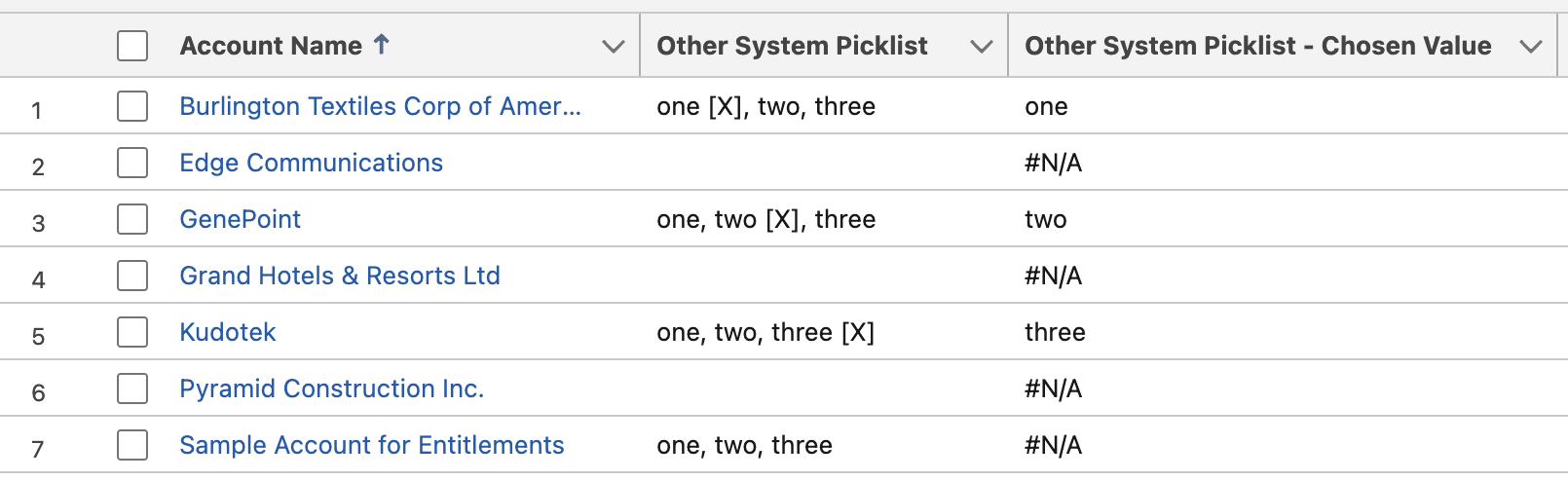
Q: The text field on a record shows a list of values with the selected value designated by an “[X]” (like “one, two [X], three”). How can I get a formula field to show just the chosen value, like the below?
A: Here’s the formula:
IF(
   /* is "[X]" in the string? */
   CONTAINS(Other_System_Picklist__c, "[X]"),
   /* if "[X]" is in the string, then. . . */
   IF(
      /* does a comma precede the "[X]" value? */
      CONTAINS(LEFT(Other_System_Picklist__c, FIND("[X]", Other_System_Picklist__c) - 2), ","),
      /* a comma precedes the "[X]" value. do some fancy stuff */
      REVERSE(
              LEFT(
                   REVERSE(LEFT(Other_System_Picklist__c, FIND("[X]", Other_System_Picklist__c) - 2)),
                   FIND(",", REVERSE(LEFT(Other_System_Picklist__c, FIND("[X]", Other_System_Picklist__c) - 2))) - 1
              )
      ),
      /* no comma precedes the "[X]" value. do some less-fancy stuff */
      LEFT(Other_System_Picklist__c, FIND("[X]", Other_System_Picklist__c) - 2)
   ),
    /* no "[X]" in the string */
   "#N/A"
)
quick observations:
as my friend Martin pointed out, this would be easier if Salesforce supported Regular Expressions in formulas.
Salesforce doesn’t, although you can use a limited REGEX() function for matching in stuff like Validation Rules.
a formula function that enabled searching from the end of a string (like InStrRev or rfind) could help, too. gotta use REVERSE() weirdly instead!
thanks to Daniel Parkhurst for the challenge! I look forward to that tasty beer next time you’re in town 😁
remember that the functions that end in _QUARTER() or _MONTH() don’t include the year, so you may want to pair them with a *_YEAR() function.
For example, the badboy below groups Opportunities by the year-and-quarter they were created over the last three years: SELECT CALENDAR_YEAR(CreatedDate), CALENDAR_QUARTER(CreatedDate), COUNT(Id) FROM Opportunity WHERE CreatedDate = LAST_N_YEARS:3 GROUP BY CALENDAR_YEAR(CreatedDate), CALENDAR_QUARTER(CreatedDate) ORDER BY CALENDAR_YEAR(CreatedDate), CALENDAR_QUARTER(CreatedDate)
the THIS_MONTH and LAST_N_YEARS items in the WHERE clauses above are date literals, and there are a whole gaggle of handy ones.
I haven’t thought of a simple way, in declarative SOQL, to perfectly say “going back to today’s date, X years ago”. Unless the number of years ago is divisible by 4, you’re likely to include or exclude one day too many, because of leap years.
WHERE CreatedDate = LAST_N_DAYS:365 might be a day too few!
WHERE CreatedDate = LAST_N_DAYS:366 might be a day too many!
WHERE CreatedDate = LAST_N_DAYS:1461 (that is, 365 * 4 + 1) should always work!
Yah, I caved and finally bought me a smartwatch. For a guy who works in tech, I have some Luddite tendencies–I generally only pick up a new technology when I see a clear use case for it.
I’d been ruminating buying one for awhile (I was particularly jazzed about the concept of an e-ink smartwatch).
But at the end of the day, my concrete use case was a device that (a) worked like a phone when I took it running (out of Bluetooth range of my iPhone), and (b) wasn’t gigantic on my ladylike wrist. Add those up and it meant I was going for a cellular model of the latest, smallest Apple Watch, the 41mm Series 9.
The watch’s purpose is to protect me from the phone, which is kind of breathtaking when I think about it: I purchased device #2 to protect me from device #1. But don’t take my word for it–it’s related in this entertaining Wired article from 2015:
Along the way, the Apple team landed upon the Watch’s raison d’être. It came down to this: Your phone is ruining your life.↩︎
I created an “Insert Current Date as ISO” shortcut from this post.
(I followed the instructions in the section titled “Alternatively, Use Automator Yourself” because I’m a sucker for learning by doing things the laborious manual way. Errors are the portals of discovery and all that!)



 Kudotek v2.0