Author Archives: Ezra Kenigsberg

Unknown's avatar

About Ezra Kenigsberg

#Salesforce architecture/data guru & @BigCommerce employee; film noir buff; expatriate Jewish New Yorker; proud papa

Get Rid of “Tables” Palette When Creating a New Google Sheet

Q: “How can I prevent the ‘Tables’ palette from appearing every time I create a new Google Sheet?

A: There’s no setting in Google Sheets to suppress it.

But the Tampermonkey browser extension, with a script, can do it:

1] install the Tampermonkey extension in your browser

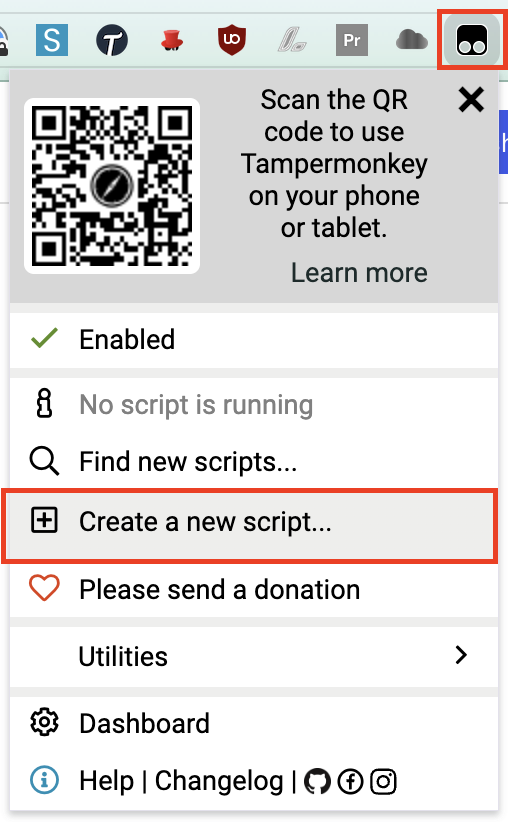
2] click the Tampermonkey icon and select “Create a new script…”

3] highlight the existing code in the <new userscript> window

4] replace the highlighted text by copying-and-pasting the code block below:

// ==UserScript==
// @name         Kill Google Sheets Tables sidebar
// @match        https://docs.google.com/spreadsheets/*
// ==/UserScript==
(function() {
    let interval = setInterval(() => {
        let sidebar = document.querySelector("div.building-blocks-sidebar > div > div > div#docs-tiled-sidebar-title");
        if (sidebar && sidebar.innerHTML === 'Tables') {
            document.querySelector("div.building-blocks-sidebar > div > div > div#docs-tiled-sidebar-title + div.docs-tiled-sidebar-close").click();
            clearInterval(interval);
        }
    }, 50);
})();

5] click “File | Save”

That’s it! The next time you open a new Google Sheet, you’ll see the “Tables” palette flicker and disappear.

props to Reddit user zoooooook’s solution

Pull URL/ID from a Google Sheet Cell

Q: “How do I get the Salesforce ID out of a hard-coded hyperlink in a Google Sheets cell?”

A: Here‘s the Apps Script function. More explanation below.

function GetURL(input){
  const sheet = SpreadsheetApp.getActiveSpreadsheet().getActiveSheet();
  const myFormula = SpreadsheetApp.getActiveRange().getFormula();
  const matches = (myFormula.indexOf("(") !== -1 && myFormula.indexOf(")") !== -1) ? myFormula.slice(myFormula.indexOf("(") + 1, myFormula.indexOf(")")) : undefined;
  const range = sheet.getRange(matches);
  // Extract the link URLs for each cell in the range
  const linkUrls = range.getRichTextValues().map(ia => ia.map(row => row.getLinkUrl()));
  // Return the link URLs
  return linkUrls;
}

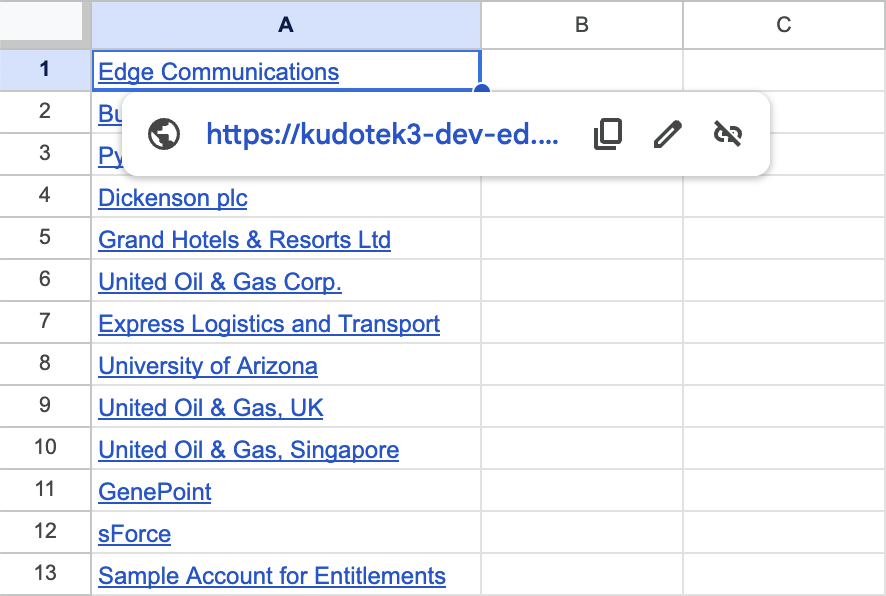
Let’s say you’ve pasted values from Salesforce into Google Sheets like the following. . .

column of hyperlinked Account Names, copied-and-pasted from Salesforce into Google Sheets

. . . and you need the Salesforce IDs behind those links.

You could get the URL from each cell, one at a time–but that‘s woefully inefficient.

The faster way is to define a custom GetURL() function you can use in the spreadsheet:

  1. click “Extensions | Apps Script” from the Google Sheets menu bar;
  2. highlight all text in the “Apps Script: Untitled Project” window that appears
  3. replace the highlighted text by copying-and-pasting the red code block above
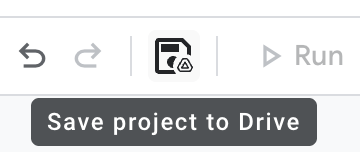
  4. click the “Save project to Drive” button (it looks like a floppy disk):

Congratulations! You now have a custom GetURL() function you can use in the spreadsheet, like this:

props to https://productivesheets.com/extract-url-from-hyperlink-google-sheets/

Two Great Jira Query Tricks

Q: “How can I find all the Jira tickets I touched in the last week?”

A: Three steps:

  1. Run a regular search in Jira.
  2. In the results screen, click Jira’s “Switch to JQL” link
    Screenshot of Jira showing the "Switch to JQL" link
  3. Once you’ve switched to JQL, run a query like the following:
    key IN updatedBy(ezra, -7d) ORDER BY key DESC
  • if your name isn’t Ezra, you probably want to modify the ezra part
  • if you want a timeframe other than the last 7 days, modify the -7d argument

Q: “How can I find all the Jira tickets in the current sprint?”

A: sprint IN currentSprints()

If, like me, you save queries and you don’t wanna constantly update the query to say sprint = 'Sprint 2' or sprint = 'Bugfix Sprint' or whatever, then sprint IN currentSprints() is your huckleberry

Pop Quiz, Hot Shot!

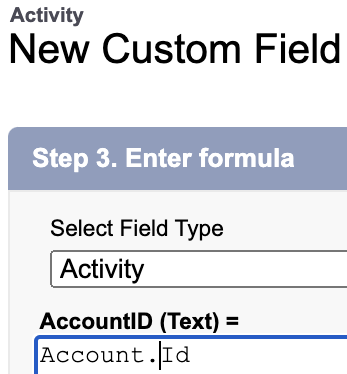
Q: Pop quiz! One of these Custom Activity Formula Fields is syntactically correct, and the other produces an error. Which is which?

Option 1:

Option 2:

A: Highlight to show answer: Option 2 is syntactically correct. I don’t know why. AccountId is a perfectly legitimate system field on both Event and Task!

Installing Data Loader on Mac

Q: Why doesn’t the installer for Data Loader on the Mac install automatically?

A: Nerd cred, I guess. It’s more badass to have to do manual things.

Anyway, if you’re on a Mac and you

  1. downloaded the latest installer from this site,
  2. double-clicked the downloaded Zip file with a name like dataloader_v62.0.2,
  3. opened the folder with a name like dataloader_v62.0.2,
  4. double-clicked the file named something like install.command, and
  5. got the error below. . .

. . . here’s what you should do:

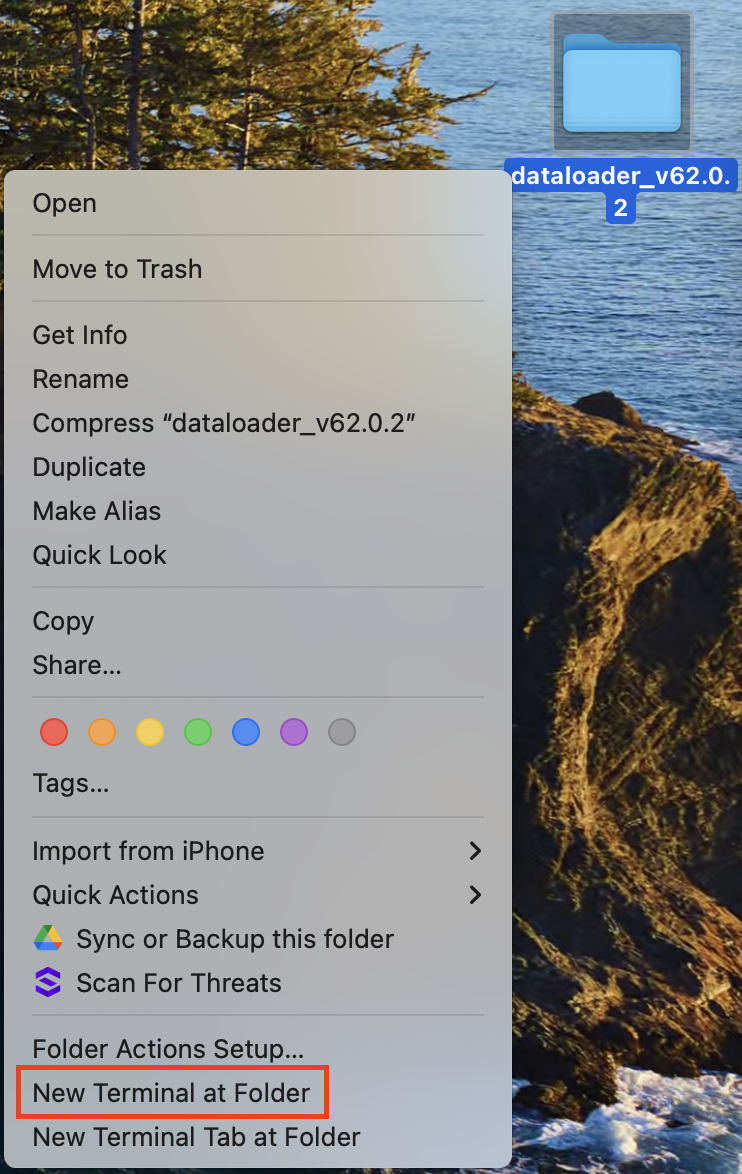
1] control-click the folder with a name like dataloader_v62.0.2,
2] select “New Terminal at Folder” from the drop-down menu

3] copy the command below, paste it into the Terminal window, and press Return:

xattr -d com.apple.quarantine install.command

. . . and that should do it! The file named install.command has been unquarantined and should now run without further complaint.


props to this StackExchange post and this old Macworld forum post

Make Salesforce Usernames Always Match Email Addys

Q: “I have lots of Salesforce logins. How do I make my username always match my email address?”

A: If you use Gmail, learn the power of pluses and periods!

Gmail tolerates extra characters in the email address. Let’s take the arbitrary email address datanerd@gmail.com. Emailing any of the following addresses will reach that recipient:

In a nutshell:

  1. Gmail addresses tolerate a plus sign followed by any sequence of letters, numbers, periods, and underscores after your username and before the @ symbol.
  2. Gmail addresses tolerate periods anywhere before the @ symbol.

Armed with this knowledge, I make each of my usernames match its email address–way less mental strain that way!


Another awesome benefit of this feature is it enables easy searching of emails.

Let’s say I have an org called “NewKillerApp”. If I put +NewKillerApp in the username and email address I use for this org, searching on “+NewKillerApp” in my Gmail turns up all the emails specifically related to that org.

Here are the full details (. . . from a 2008 Google post)

Thanks to former coworker Luis Botero for reminding me of this cool feature!

Stop Watching Issues, Jira!

Q: How do I stop Jira automatically setting me as a watcher every time I create or contribute to an issue?

A: In any Jira screen,

1] click your Account menu in the upper right-hand corner and choose “Personal Settings“:

2] In Personal Settings, change “Watch your issues” to “Disabled” and click the “Save changes” button:

that’s it!


plucked from this Jira support page.

Can Integration Licenses See Standard Objects?

Q: Can Salesforce Integration Licenses access Standard Objects like Accounts and Opportunities?

A: Yes, but only with some configuration weirdness!

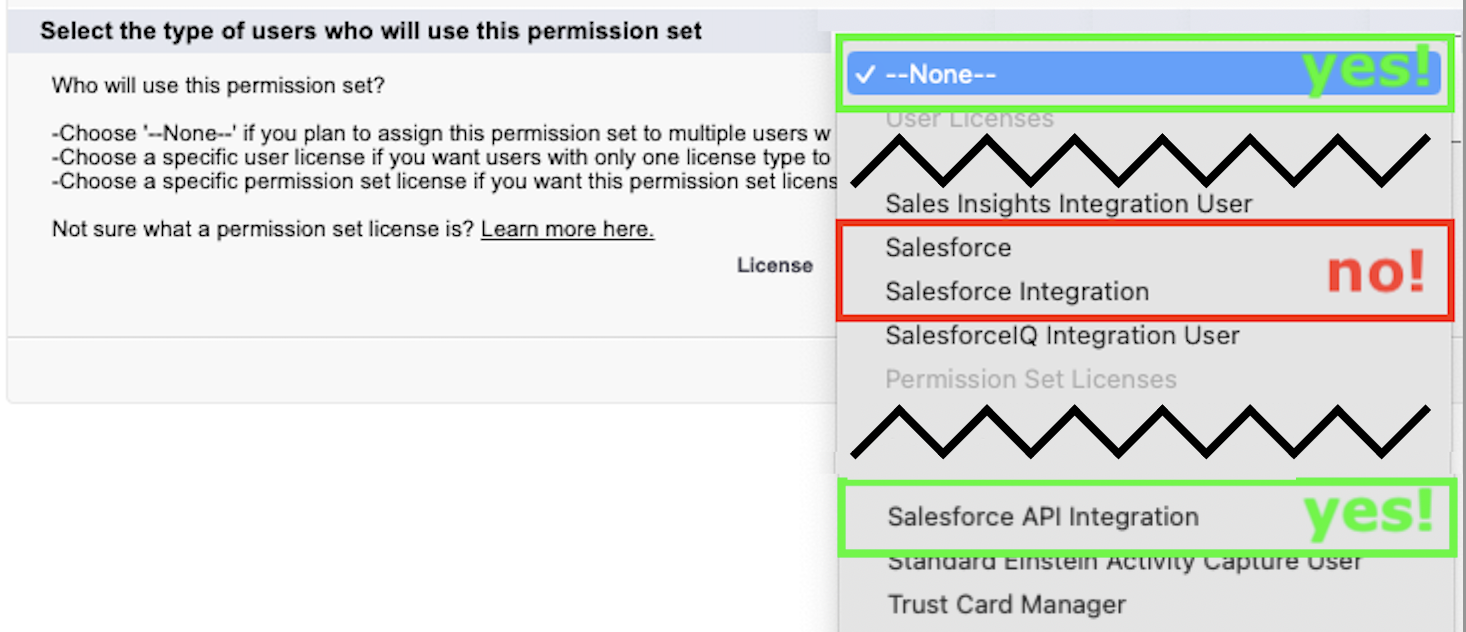
To access Standard Objects, a userid with a Salesforce Integration License must be assigned to the right kind of Permission Set: the Permission Set’s “License” field must be set to

  • no specific License, or
  • a “Salesforce API Integration” License:
  • a Permission Set whose “License” field is “Salesforce” can’t be assigned to a userid with a Salesforce Integration License, and
  • a Permission Set whose “License” field is “Salesforce Integration” can’t access Standard Objects.
  • And a Salesforce Integration License’s Profile can’t access Standard Objects, either.

go figure.

thanks to Josh Dehkordi and Surya Kamkipati for their help sorting this out!

Blocking Browser Ads, the DIY Way

Q: How do I block browser advertisements without purchasing an ad blocker?

A: Adding entries to your HOSTS file enables you to block advertisements by blocking ad-servers’ domains. To install:

1] download the “hosts.zip” file from this website.

2] install it as follows:

For Windows PC: instructions on that page help you install the HOSTS file on your computer.

For MacOS: I copied the contents of the text file in hosts.zip, and added it to my Mac’s HOSTS file by

  1. double-clicking my hard drive icon;
  2. pressing ⌘-Shift-Period in the Finder window to view all files;
  3. double-clicking the etc folder, then
  4. opening the HOSTS file in a text editor (I use Visual Studio Code), pasting in the clipboarded contents, and saving.

For Unix: heck if I know

Divorce Google! Part 2

Q: How do I view YouTube videos without participating in its toxic recommendation algorithm?

A: Three steps!

1] install Auto Incognito Mode in your browser

2] click the Auto Incognito Mode extension’s button (it looks like a hat and sunglasses) and select “Options” from the dropdown menu:

3] add the following two lines to the list of filters, then click the Save button:
*://*.youtube.com/*
*://youtube.com/*

that’s it!


ps while we’re at it. . .

  • I also strongly recommend switching from Chrome to Brave. It’s easy!
  • heck, add filter lines to run your Google searches anonymously:
    *://www.google.com/*
    *://google.com/*

All chapters of “Divorce Google”: