Q: “How can I see all Permission Sets assigned to a user, regardless whether they’re assigned directly to the Permission Set or via a Permission Set Group?”
A: Install the “PermSet List Plus” Chrome extension! (updated 2026-01-16)
Show all the Permission Sets a user is assigned, regardless whether they’re
- directly assigned to a Permission Set, or
- indirectly assigned via a Permission Set Group!
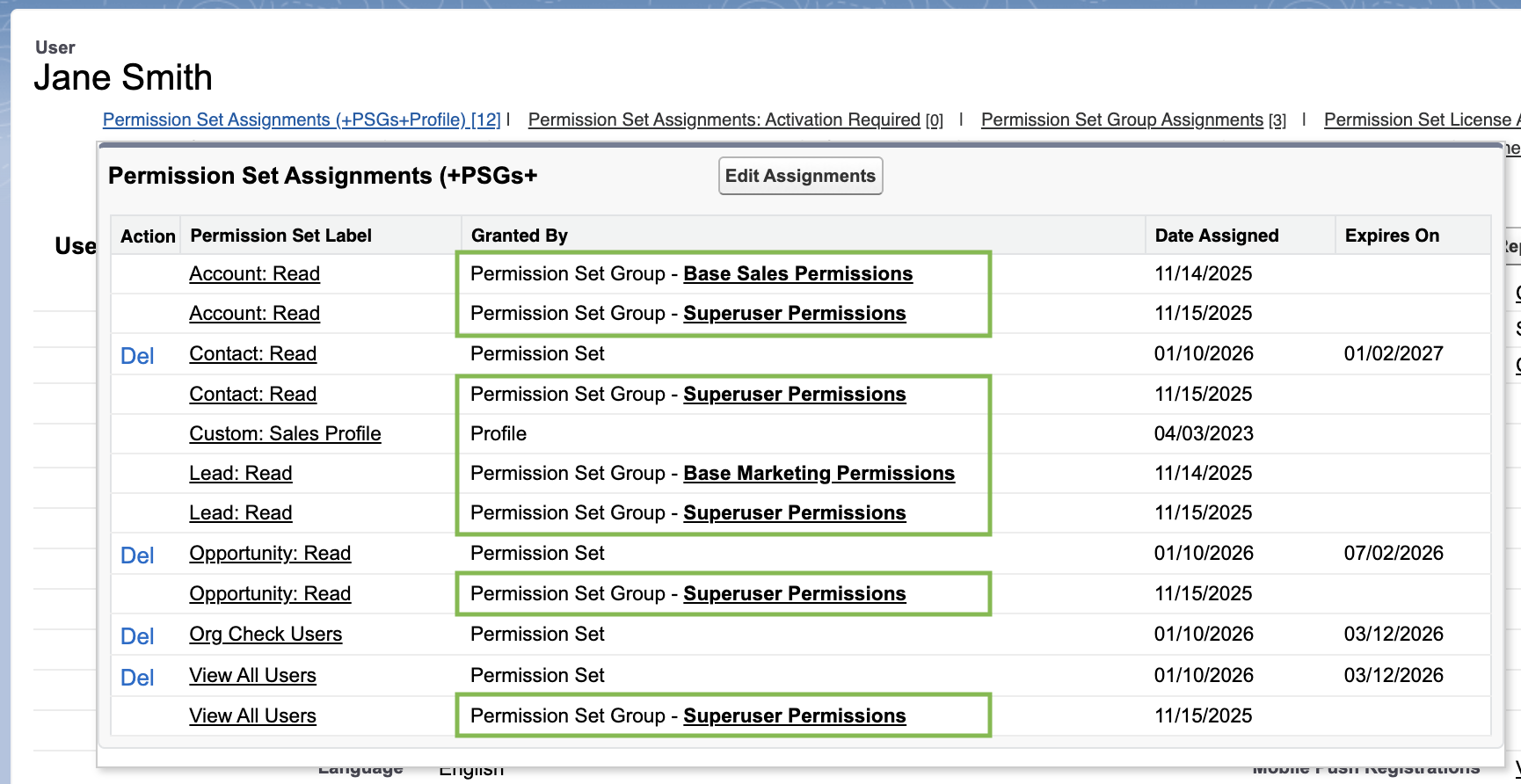
- Works with any Salesforce instance (production, sandbox, and developer editions).
- Works in both Lightning and Classic.
- Hugely helpful for Salesforce Administrators, Developers, Architects, and Superusers.
Here’s my previous noodling on this question, if you’re interested.
- I recommend voting for this IdeaExchange Idea, which asks for this:

. . . there’s some ability to do this with Salesforce’s newish “View Summary” button, but it’s not the same (here’s my rant, if you’re interested).
- I’ve been noodling with SOQL, and come up with this:
SELECT Label, Type,
      (SELECT PermissionSet.Label, Assignee.Name
       FROM PermissionSet.Assignments
       WHERE Assignee.Name = 'USERNAME'),
      (SELECT PermissionSetGroup.MasterLabel, PermissionSet.Label
       FROM PermissionSet.PermissionSetGroupComponents
       WHERE PermissionSetGroupId IN
            (SELECT PermissionSetGroupId
             FROM PermissionSetAssignment
             WHERE Assignee.Name = 'USERNAME'))
FROM PermissionSet
WHERE Type = 'Regular'
. . . which returns goodish output in Workbench (albeit with empty rows), but looks ugly in Salesforce Inspector Reloaded or Developer Console:

- Reporting doesn’t cut it, either. I think the proper answer is gonna be Flow or Apex code. Reply to this post if you know a solution that 100% solves this need!
 Kudotek v2.0