Q: “How can I prevent the ‘Tables’ palette from appearing every time I create a new Google Sheet?”
A: There’s no setting in Google Sheets to suppress it.
But the Tampermonkey browser extension, with a script, can do it:
1] install the Tampermonkey extension in your browser
2] click the Tampermonkey icon and select “Create a new script…”
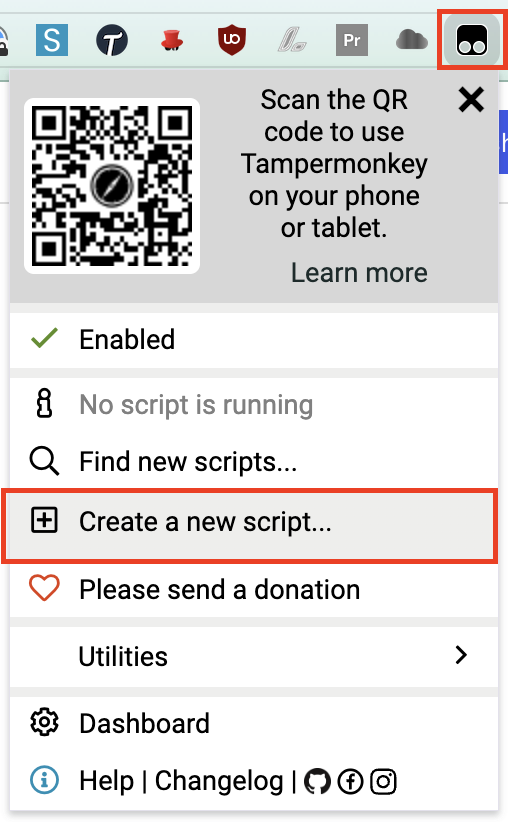
3] highlight the existing code in the <new userscript> window
4] replace the highlighted text by copying-and-pasting the code block below:
// ==UserScript==
// @name         Kill Google Sheets Tables sidebar
// @match        https://docs.google.com/spreadsheets/*
// ==/UserScript==
(function() {
    let interval = setInterval(() => {
        let sidebar = document.querySelector("div.building-blocks-sidebar > div > div > div#docs-tiled-sidebar-title");
        if (sidebar && sidebar.innerHTML === 'Tables') {
            document.querySelector("div.building-blocks-sidebar > div > div > div#docs-tiled-sidebar-title + div.docs-tiled-sidebar-close").click();
            clearInterval(interval);
        }
    }, 50);
})();
5] click “File | Save”
That’s it! The next time you open a new Google Sheet, you’ll see the “Tables” palette flicker and disappear.
 Kudotek v2.0
This is amazing and very needed. Thank you!