Q: I’m getting too many notifications from Jira. How do I get more signal, less noise?
A: The three ways I do it:
1] When I get a Jira email I didn’t want, I click the “Manage Notifications” button in the lower left-hand corner of the email:

. . . and chop down Default Notification Settings. Here’s where I’m at now:

. . . and nothing else.
2] I also keep a sharp eye on how many tickets I’m “Watching“, to use Jira’s term of art.
I turn individual tickets’ Watched status on and off using the eyeball icon in the upper right-hand corner of an individual ticket:

3] I bulk-deactivate Watching for a bunch of tickets by
a] turning on JQL after a search:

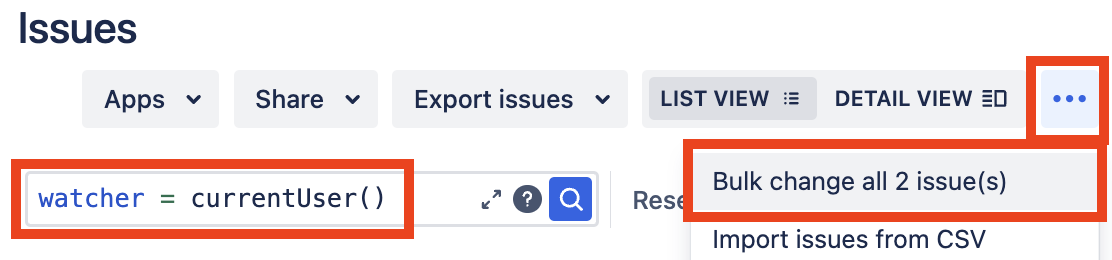
b] searching for watcher = currentUser(), then choosing “Bulk change all X issue(s)” from the hamburger:
c] walking through the “Bulk Operation” wizard, and choosing “Stop Watching Issues” when prompted

 Kudotek v2.0
. . . and don’t forget this tip to tell Jira to stop auto-following tickets in the first place