Q: The text field on a record shows a list of values with the selected value designated by an “[X]” (like “one, two [X], three”). How can I get a formula field to show just the chosen value, like the below?
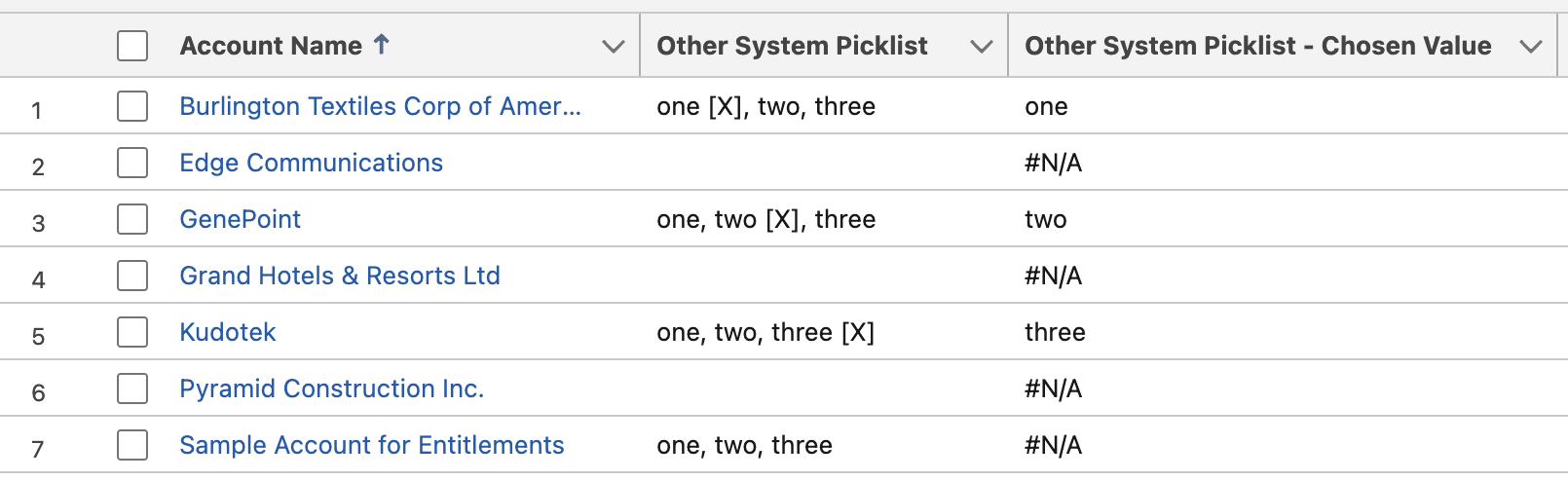
A: Here’s the formula:
IF(
   /* is "[X]" in the string? */
   CONTAINS(Other_System_Picklist__c, "[X]"),
   /* if "[X]" is in the string, then. . . */
   IF(
      /* does a comma precede the "[X]" value? */
      CONTAINS(LEFT(Other_System_Picklist__c, FIND("[X]", Other_System_Picklist__c) - 2), ","),
      /* a comma precedes the "[X]" value. do some fancy stuff */
      REVERSE(
              LEFT(
                   REVERSE(LEFT(Other_System_Picklist__c, FIND("[X]", Other_System_Picklist__c) - 2)),
                   FIND(",", REVERSE(LEFT(Other_System_Picklist__c, FIND("[X]", Other_System_Picklist__c) - 2))) - 1
              )
      ),
      /* no comma precedes the "[X]" value. do some less-fancy stuff */
      LEFT(Other_System_Picklist__c, FIND("[X]", Other_System_Picklist__c) - 2)
   ),
    /* no "[X]" in the string */
   "#N/A"
)
quick observations:
- as my friend Martin pointed out, this would be easier if Salesforce supported Regular Expressions in formulas.
- thanks to Daniel Parkhurst for the challenge! I look forward to that tasty beer next time you’re in town 😁
 Kudotek v2.0